Data Migration Checklist for Small Business: Complete Planning Guide
Complete data migration checklist small business guide covering planning, tools, testing, and risk management for successful system transitions.
Contents
Data migration involves transferring information from one system to another. This includes moving customer records, financial data, inventory lists, and operational files between different software platforms or storage locations. For small businesses, this typically happens when upgrading systems, moving to cloud platforms, or consolidating multiple databases. Data migration for a small business costs $2,500 to $19,000, depending on complexity and scope.
Exporting data and importing it somewhere new sounds simple. In practice, data migration is one of the most overlooked operational challenges small businesses face, particularly as more of them move to cloud systems.
What Data Migration Actually Involves
The process sounds straightforward but requires careful planning. I’ve worked with small businesses that lost weeks of productivity because they underestimated the complexity. Others have seen immediate improvements in efficiency after proper migration planning.
The data migration market has grown substantially in recent years and is expected to continue expanding over the coming decade. This growth reflects how essential these transitions have become for business competitiveness.
Pre-Migration Assessment and Planning
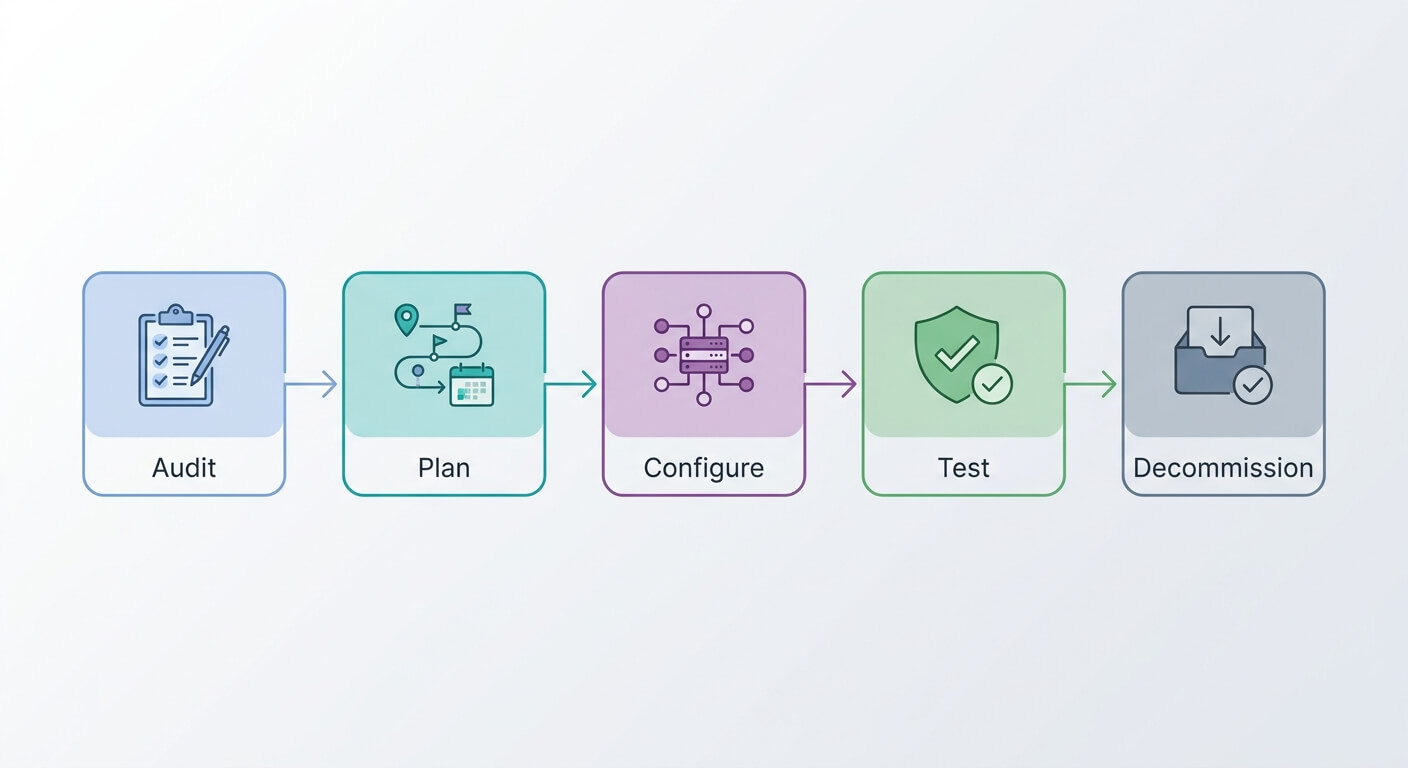
Before touching any data, you need a comprehensive understanding of your current situation. This assessment phase determines everything that follows.
Start by cataloguing all your data sources. Most small businesses have more data repositories than they realise. Customer information might live in your CRM, email platform, and accounting software. Product data could span inventory management systems, e-commerce platforms, and supplier databases.
Document the format of each data set. Some information exists in structured databases with clear fields and relationships. Other data sits in spreadsheets, text files, or even paper records that need digitising first.
Assess data quality honestly. How much duplicate information exists across systems? Which records contain errors or outdated information? How consistent are naming conventions and data formats? Poor data quality amplifies during migration, creating bigger problems in your new system.
Identify dependencies between different data sets. Customer records might link to order history, which connects to inventory data. Understanding these relationships prevents broken connections after migration.
Define your migration scope clearly. Are you moving everything or just active records? Will you transfer historical data or archive older information? These decisions affect timeline, cost, and complexity.
Consider timing carefully. When can your business handle potential downtime? Which periods have lower transaction volumes? Plan migration during your quietest operational windows.
Creating Your Data Migration Checklist
A systematic data migration checklist small business owners can follow prevents costly mistakes and ensures nothing gets overlooked during the transition process.
Data Inventory and Mapping
List every data source in your current systems. Include databases, spreadsheets, cloud storage, and any standalone applications containing business information.
Map source data fields to destination system fields. Your old customer database might use “Company Name” while the new system expects “Organisation.” Document these field mappings for every data type.
Identify data that doesn’t fit the new system structure. Some information might need reformatting, combining, or splitting across multiple fields.
Note any custom fields or unique data structures in your current system. These often require special handling during migration.
Data Cleansing and Preparation
Remove duplicate records before migration. It’s easier to clean data in familiar systems than fix problems in new ones.
Standardise formats across all records. Ensure phone numbers, addresses, and dates follow consistent patterns.
Validate critical information like email addresses and contact details. Migration offers an opportunity to update and verify key data.
Archive or delete obsolete records. Old customer accounts, discontinued products, and expired contracts don’t need to move to your new system.
Technical Requirements
Verify compatibility between source and destination systems. Check supported file formats, data size limits, and any technical constraints.
Plan for data transformation needs. Some information might require conversion between different formats or structures.
Ensure adequate storage space in the destination system. Factor in any data expansion that might occur during migration.
Test network capacity and speed. Large data transfers can strain internet connections and affect business operations.
Security and Compliance
Document data handling procedures throughout migration. This matters for compliance with privacy regulations and internal security policies.
Plan for data encryption during transfer. Sensitive information needs protection while moving between systems.
Identify who has access to data during migration. Limit permissions to essential personnel only.
Ensure backup procedures cover the migration period. You need recovery options if something goes wrong.
Choosing Migration Tools and Methods
Small businesses have several options for executing data migration, each with distinct advantages and trade-offs.
Manual migration works for small data volumes and simple transfers. You export data from the old system and import it into the new one. This approach offers maximum control but requires significant time investment.
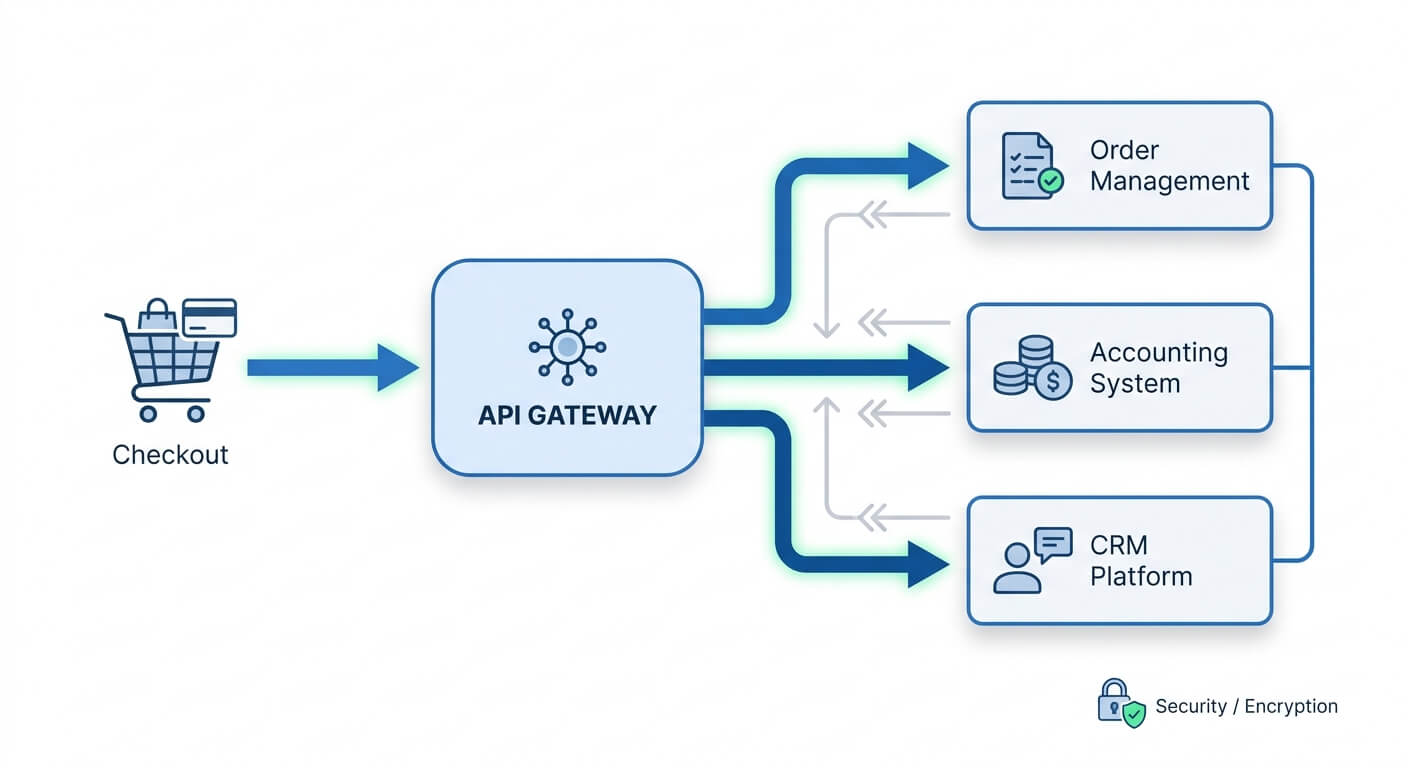
Automated migration tools handle larger volumes and complex transformations. These solutions can map fields, validate data, and handle format conversions automatically. System integration becomes essential when connecting disparate platforms that don’t naturally communicate.
Hybrid approaches combine manual oversight with automated execution. You define the rules and mappings while software handles the actual data transfer.
Cloud-based migration services offer scalability and expertise without internal resource requirements. Global spending on public cloud services continues to grow, reflecting widespread adoption of these solutions.
Consider your team’s technical capabilities when choosing methods. Complex migrations might justify professional assistance, while simple transfers can happen internally.
Evaluate the total cost including time, tools, and potential business disruption. Sometimes paying for professional AI automation saves money compared to extended internal efforts.
Risk Management and Backup Strategies
Data migration carries inherent risks that proper planning can minimise but never eliminate entirely. Smart backup strategies provide essential safety nets.
Create complete backups of all source systems before starting migration. Store these backups separately from your primary systems and verify they’re recoverable.
Plan for rollback scenarios. If migration fails or creates problems, you need quick ways to restore operations with your original systems.
Implement incremental backups during long migration processes. This captures any new data created while migration is underway.
Test backup restoration procedures before you need them. Knowing backups exist differs from confirming they actually work.
Document recovery timelines and procedures. How long would system restoration take? Which staff members can execute recovery processes?
Consider business continuity during migration. Can you maintain operations if migration takes longer than expected? Plan for extended timelines and potential complications.
Maintain parallel systems during transition periods when possible. Running old and new systems simultaneously reduces risk but requires additional resources.
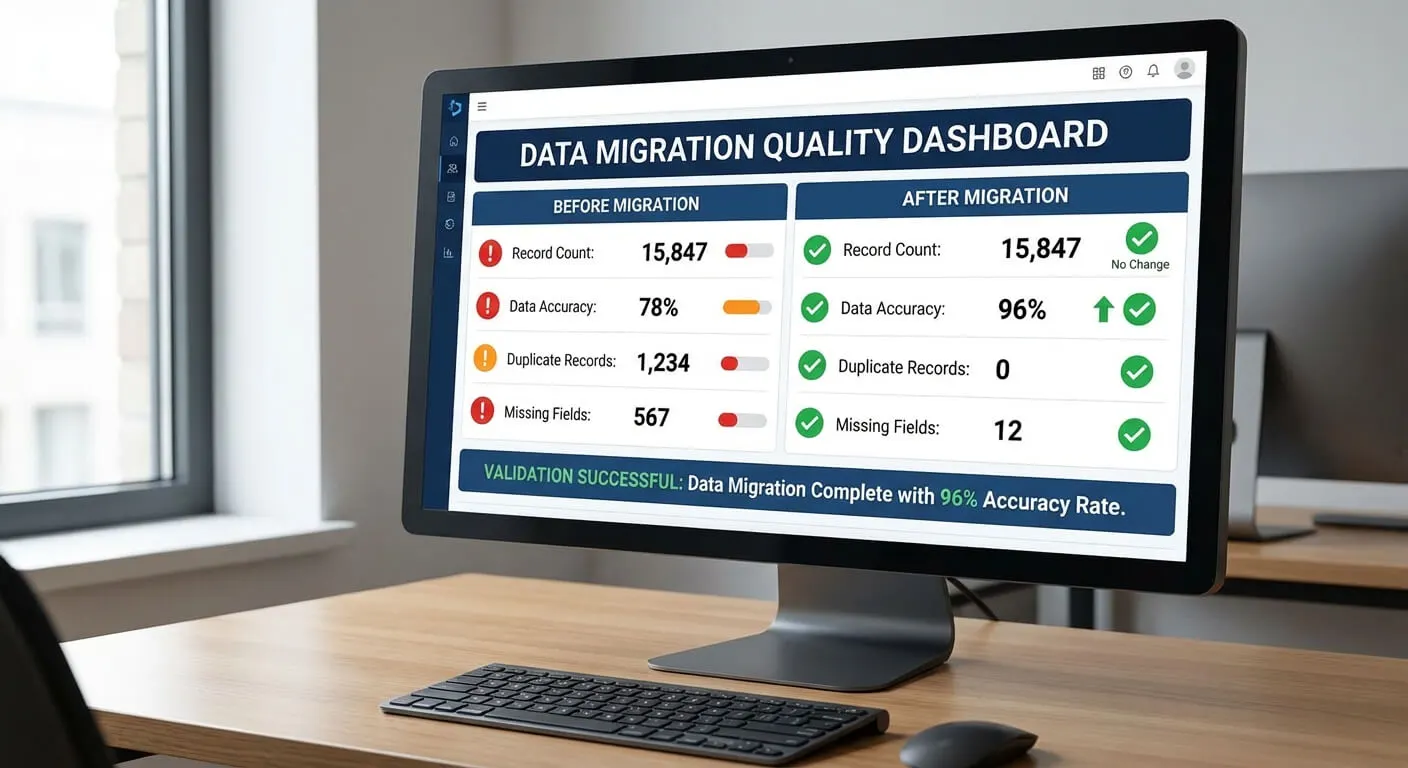
Monitor data integrity throughout migration. Compare record counts, field values, and relationships between source and destination systems.
Testing and Validation Procedures
Thorough testing separates successful migrations from expensive disasters. Small businesses often skip this step due to time pressure, but validation prevents much larger problems.
Start with small test migrations using representative data samples. Choose records that include various data types, relationships, and edge cases your business encounters.
Validate data completeness by comparing record counts between source and destination systems. Missing records indicate problems with the migration process.
Check data accuracy by reviewing specific records in both systems. Do customer names, addresses, and order histories match exactly?
Test system functionality with migrated data. Can you generate reports, process transactions, and access information as expected?
Verify data relationships remain intact. Customer orders should still connect to the right customer records. Product information should link correctly to inventory data.
Perform user acceptance testing with actual staff members. Have team members complete typical tasks using the migrated data to identify practical problems.
Document any discrepancies found during testing. Track what went wrong, why it happened, and how you fixed it. This information guides future migrations and helps prevent repeated mistakes.
Plan for iterative testing cycles. Few migrations work perfectly on the first attempt. Budget time for multiple rounds of testing and refinement.
Post-Migration Optimisation
Successful data migration extends beyond simply moving information from one system to another. Post-migration optimisation ensures you realise the full benefits of your new system.
Monitor system performance with the migrated data. New systems might behave differently with your actual business information compared to test data.
Optimise database indexes and queries for your specific data patterns. This can significantly improve response times and user experience.
Train staff on any changes in data structure or access procedures. Even successful migrations often alter how people interact with business information.
Implement data governance procedures for your new system. Establish rules for data entry, maintenance, and quality control that prevent future problems.
Set up monitoring and alerting for data quality issues. Automated checks can catch problems before they affect business operations.
Plan regular data maintenance schedules. Clean data stays clean only with ongoing attention to quality and accuracy.
Document lessons learned from the migration process. This knowledge proves invaluable for future system changes or expansions.
Measure the business impact of migration. Track improvements in efficiency, accuracy, or capability that justify the investment.
Cost Considerations and Budgeting
Data migration costs extend far beyond software licensing or professional services. Understanding the full financial picture helps small businesses plan appropriately.
Direct costs include migration tools, cloud storage, and any professional services required. These expenses are usually easiest to predict and budget.
Indirect costs often exceed direct expenses. Staff time for planning, testing, and execution represents significant investment. Business disruption during migration can affect revenue.
Consider opportunity costs carefully. Time spent on migration diverts attention from other business priorities. Factor this into your planning and resource allocation.
Budget for unexpected complications. Few migrations proceed exactly as planned. Reserve additional time and money for problem resolution.
Evaluate the cost of doing nothing. Outdated systems create ongoing inefficiencies and limitations. Migration costs should be weighed against the expense of maintaining problematic systems.
Consider phased migration approaches to spread costs over time. Moving data in stages can reduce upfront investment while delivering incremental benefits.
Factor in training and change management costs. New systems require staff education and potentially revised business processes.
Calculate return on investment based on improved efficiency, reduced errors, and enhanced capabilities. Process optimisation following migration often delivers measurable productivity gains.
Common Pitfalls and How to Avoid Them
Small business data migration failures follow predictable patterns. Understanding common mistakes helps you avoid expensive problems.
Rushing the planning phase creates problems throughout migration. Inadequate assessment and preparation cause most migration failures. Invest time upfront to save problems later.
Underestimating data complexity is extremely common. Business data contains more relationships, exceptions, and edge cases than initially apparent. Thorough analysis prevents surprises.
Skipping data cleansing migrates problems to new systems. Poor quality data doesn’t improve through migration. Clean data before moving it.
Inadequate testing leads to production problems. Compressed timelines often sacrifice testing, creating bigger issues after go-live.
Poor communication with stakeholders causes resistance and confusion. Keep staff informed about migration plans, timelines, and any changes to their workflows.
Ignoring business continuity needs can halt operations. Plan for maintaining essential functions during migration periods.
Lack of rollback planning leaves no options when problems occur. Always maintain the ability to restore previous systems if needed.
Unrealistic timeline expectations create pressure that leads to mistakes. Allow adequate time for each migration phase, including contingency periods.
Working with Professional Services

Many small businesses benefit from professional assistance with data migration, even when handling some aspects internally.
Professional services bring specialised expertise and tools that small businesses rarely possess internally. They’ve handled similar migrations and understand common challenges.
Consider hybrid approaches where professionals handle technical complexity while you manage business decisions and validation.
Evaluate providers based on relevant experience with your type of business and systems. Generic IT services might lack specific knowledge your migration requires.
Clearly define responsibilities and deliverables in service agreements. Who handles data cleansing? What testing is included? When is the migration considered complete?
Maintain involvement throughout professionally managed migrations. External providers need your business knowledge to make appropriate decisions.
Strategic consulting can help evaluate migration approaches and select appropriate solutions for your specific situation.
Plan for knowledge transfer from service providers. You’ll need to understand and maintain systems after migration completes.
Budget for ongoing support and maintenance. Complex migrations often require post-implementation assistance and optimisation.
The Canadian Federation of Independent Business (CFIB) 2025 Report
The gap worth noticing is between using digital tools and being genuinely digitalised. Most small businesses are well into the first and have barely started the second: plenty of software, very little of it connected.
This gap between tool adoption and integration highlights why data migration matters. Small businesses often accumulate multiple systems over time without proper connections between them. Migration projects offer opportunities to consolidate and integrate these disparate tools.
Canadian SMEs report productivity gains in the first year after technology adoption. Importantly, 9% see returns within two months, while 27% realise benefits within the first year.
These findings suggest that well-executed data migration and system integration can deliver measurable business improvements relatively quickly. The key lies in proper planning and execution rather than simply moving data between systems.
Advanced Migration Strategies
As small businesses grow more sophisticated, advanced migration strategies become relevant for complex data environments.
Incremental migration moves data in phases rather than all at once. This approach reduces risk and allows for learning and adjustment between phases.
Real-time synchronisation maintains data consistency between old and new systems during extended migration periods. This enables parallel operation while ensuring data integrity.
Data warehousing approaches consolidate information from multiple sources into centralised repositories. This can simplify future migrations and improve business intelligence capabilities.
API-based integration provides ongoing connections between systems rather than one-time data transfers. This approach supports dynamic business environments with frequent data updates.
Cloud-native migration strategies take advantage of cloud platform capabilities for scaling, backup, and disaster recovery. These approaches often provide better long-term flexibility.
Automated validation and monitoring tools can continuously check data quality and integrity throughout migration processes. This reduces manual effort while improving reliability.
Consider how AI automation can enhance migration processes through intelligent data mapping, quality checks, and anomaly detection.
Future-Proofing Your Data Strategy
Successful data migration extends beyond solving immediate problems to positioning your business for future growth and changes.
Choose systems and approaches that accommodate business expansion. Your migration investment should support growth rather than require replacement as you scale.
Implement data governance frameworks that maintain quality and consistency over time. Good data management prevents future migration complexity.
Plan for ongoing system evolution and integration needs. Business technology continues evolving, requiring flexible data architectures.
Document your data architecture and migration decisions. This knowledge becomes valuable for future system changes and staff transitions.
Monitor industry trends and technological developments that might affect your data strategy. Staying informed helps you anticipate and prepare for future changes.
Build relationships with technology providers and consultants who can support ongoing needs. Data management requires ongoing attention and occasional expert assistance.
Invest in staff training and capability development. Internal knowledge and skills reduce dependence on external providers for routine data management tasks.
Data migration represents both challenge and opportunity for small businesses. Proper planning, systematic execution, and attention to detail determine success or failure. The investment in doing migration right pays dividends through improved efficiency, better decision-making capabilities, and competitive advantages that compound over time.
Frequently Asked Questions
How long does data migration typically take for small businesses?
Data migration timelines vary significantly based on data volume and complexity. Simple migrations with clean data might complete in days, while complex multi-system migrations can take several months. Most small business migrations require 4-12 weeks including planning, testing, and validation phases.
What happens if data migration fails halfway through?
Failed migrations require immediate rollback to restore business operations. This highlights why comprehensive backup strategies are essential. Most failures result from inadequate planning or testing rather than technical problems. Having rollback procedures documented and tested beforehand minimises business disruption.
Can small businesses handle data migration internally without professional help?
Many small businesses successfully manage simple data migrations internally, especially when moving between similar systems with clean data. However, complex migrations involving multiple systems, data transformation, or integration requirements often benefit from professional assistance to avoid costly mistakes and ensure successful outcomes.
How much should small businesses budget for data migration projects?
Data migration costs typically range from $2,500 to $19,000 for small businesses, depending on complexity and scope. This includes tools, professional services, and internal time investment. Budget additional contingency funds for unexpected complications, as most migrations encounter some unforeseen challenges requiring additional resources.