

Single workflow joining two systems
From $450
One trigger, one path, no exception handling
We design and build n8n automations that you own, and move businesses off Zapier, Make and Power Automate when per-task pricing or missing logic starts to hurt, working across the UK, US, and Australia. A single n8n workflow is a fixed price from $450.
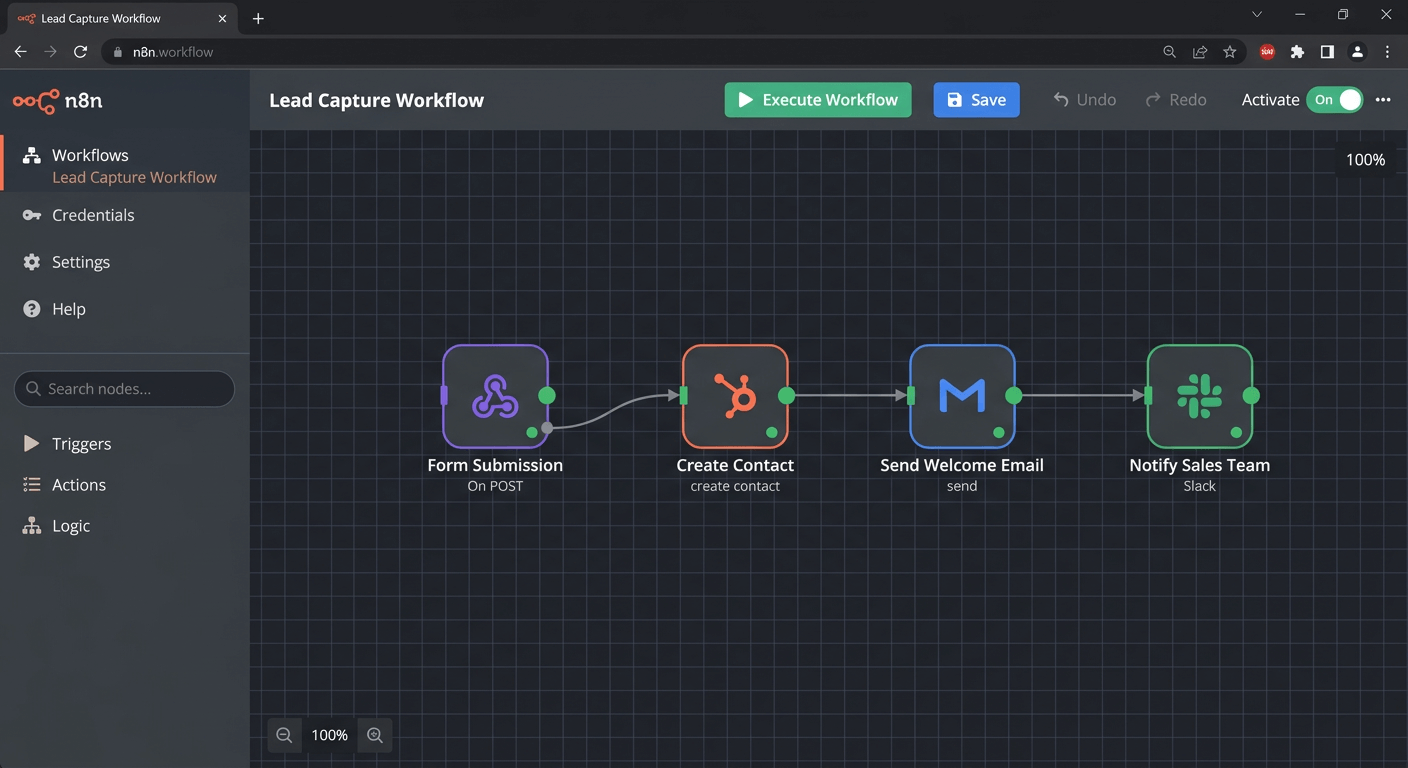
Example workflow
n8n is an open-source workflow automation platform you can self-host, which makes it the usual destination for businesses outgrowing Zapier or Make. Hiring an n8n developer gets you three things a no-code tool cannot: real logic in JavaScript inside a workflow, no per-task fee as volume rises, and the option to run the whole thing on infrastructure you own. Marathon designs and builds n8n workflows, tests them on its own infrastructure, then hands them over to run on your n8n, self-hosted or n8n Cloud, and migrates existing Zapier and Make automations across without losing what already works.
A workflow only earns its build cost if the manual task behind it is expensive enough. Our process cost calculator gives you that figure in about thirty seconds, along with how many hours of development the first year of saving would justify.
The honest version: most businesses do not need to leave Zapier. If your automations are simple, low volume, and working, staying put is the cheaper answer and we will say so. The three reasons to move are cost that scales with every task, logic the builder cannot express, and data you are not allowed to send to a third party.
From a single workflow to a connected set covering a whole process, built with error handling, retries and alerting rather than a happy path that fails quietly.
An audit first, because most accounts carry dormant and duplicated automations. What survives is rebuilt, run in parallel until output matches, then cut over.
Your own n8n set up, self-hosted or on n8n Cloud depending on your execution volume, with every workflow exported into it. You own the workflows, the account and the data.
Systems with no ready-made node, unusual authentication, or logic that needs real JavaScript rather than a visual builder.
Fixed prices, agreed after a discovery call and before any work starts.
*All prices are listed in US dollars.
From $450
One trigger, one path, no exception handling
From $1,400
Several systems, error handling, notifications
From $2,375
Extraction, validation, approval routing
From $7,250
Bespoke interface, database, user accounts
A $1,400 workflow automating 5 hours a week of staff time pays for itself in 2 to 4 months. Work out yours
Full breakdown: how to calculate true AI automation costs.
n8n. Self-hostable, no per-task fee when you run it yourself, real JavaScript inside workflows. The trade is that someone on your side has to own hosting and updates, or you use n8n Cloud and n8n runs the servers. Either way the workflows are yours.
Make. Stronger visual builder than Zapier and cheaper at volume, but still operation-priced and still hosted for you. A reasonable step if you want to stay fully managed.
Microsoft Power Automate. The right answer when the work lives inside Microsoft 365 and the licensing is already paid. Premium connectors and non-Microsoft systems are where the cost reappears.
Staying on Zapier. Genuinely correct for simple, low-volume automation. The migration only pays back when one of the three problems above is real for you.
Three things, in order. First, work out which processes are worth automating and which are not, because automating a bad process just makes it fail faster. Second, build the workflows with proper error handling, retries and alerting rather than a happy path that breaks quietly. Third, hand over documentation and access so you are not dependent on the person who built it. If you only want the middle one, say so and we will scope just that.
Yes. A single well-defined workflow, for example turning form submissions into CRM records with notifications, is usually a few days of work. We charge a fixed price once scope is agreed, from $450 for a single workflow. There is no minimum retainer, and we would rather build one workflow that works than sell an engagement you do not need.
It depends on why you are leaving. If cost at volume is the problem, n8n and Make both help and n8n helps more because self-hosting removes per-task pricing entirely. If missing logic is the problem, n8n and Power Automate can both express conditions Zapier cannot, and n8n lets you drop into JavaScript when the visual builder runs out. If data residency or privacy is the problem, self-hosted n8n is the only one of the three that keeps everything on your own infrastructure. If none of those apply to you, stay on Zapier.
n8n is the most widely used one, under a fair-code licence that allows self-hosting for internal business use. Activepieces and Windmill are the other names worth knowing. The trade-off with any open-source option is that you own the hosting, updates and uptime. We do not host client workflows: we build and test on our own infrastructure, then export the finished workflow to your installation, so it is yours from day one. If you have no n8n yet, we help you choose between self-hosting and n8n Cloud and set it up.
We audit what you have first, because a good proportion of Zaps in most accounts are dormant, duplicated or superseded, and migrating them is wasted money. What survives the audit is rebuilt in n8n, run alongside the existing Zaps until output matches, then cut over. The parallel run is the part people skip and the part that prevents a silent gap in your data.
Yes. If your business already runs on Microsoft 365 and the work sits inside SharePoint, Teams, Outlook and Dataverse, Power Automate is often the better answer and its licensing may already be paid for. We will tell you when that is true rather than pushing n8n. Where it falls down is complex logic, non-Microsoft systems, and premium connector licensing, and that is usually where n8n takes over.
n8n Cloud is the right starting point for most businesses: no servers to run, and the cost is predictable at moderate volume. Self-hosting wins when execution volume is high enough that cloud pricing bites, when data cannot leave your own infrastructure, or when you need community nodes and custom code that cloud restricts. We run both, and we will size it against your actual execution count rather than guessing.
Every workflow we build has an error path that alerts a human rather than failing silently, retries where a retry is safe, and does not repeat work that already succeeded. We also monitor execution counts, because the failure that costs the most is the workflow that reports success while quietly doing nothing.
Yes. If the system has an HTTP API, n8n can call it directly, and where authentication is unusual we build a custom node or handle it in code. Missing nodes are rarely the blocker. The blocker is usually a system with no API at all, and we will tell you early if that is what you have.
Yes. The workflows are yours, in your n8n instance, with documentation. We do not hold client automations in an account you cannot reach. That is a deliberate choice: work that traps you is not work worth buying.
A task that takes a member of staff 5 hours a week costs about $10,400 a year, at a staff cost of $40 an hour. Automating it typically saves between half and four fifths of that, so a $1,400 workflow pays for itself in 2 to 4 months and keeps saving after that. Your own payback depends on how often the task happens, how long it takes and who does it. Our free process cost calculator works it out from your numbers, and we calculate it properly before quoting.
Related work: AI automation, system integration, Xero integration, and accounts payable automation.
How to choose an automation platform, and when moving off the one you have is worth it.
Complete n8n automation guide for SMBs. Save 10+ hours weekly with open-source workflows. Setup tips, real examples, and ROI tracking included.

Discover the 15 best workflow automation tools for small business in 2026. Compare features, pricing and find the perfect fit for your needs.

Build vs buy automation: should small businesses build their own tools? Use the 4C test to decide when to subscribe, when to own the logic, and why.
Tell us what you are automating today and we will tell you whether moving is worth it.
Book a Discovery Call