Payment API Integration: The Myths That Quietly Cost SMBs Money
Payment API integration explained for SMB owners: what really breaks, when Zapier or n8n is enough, and how to keep reconciliation clean.
Contents
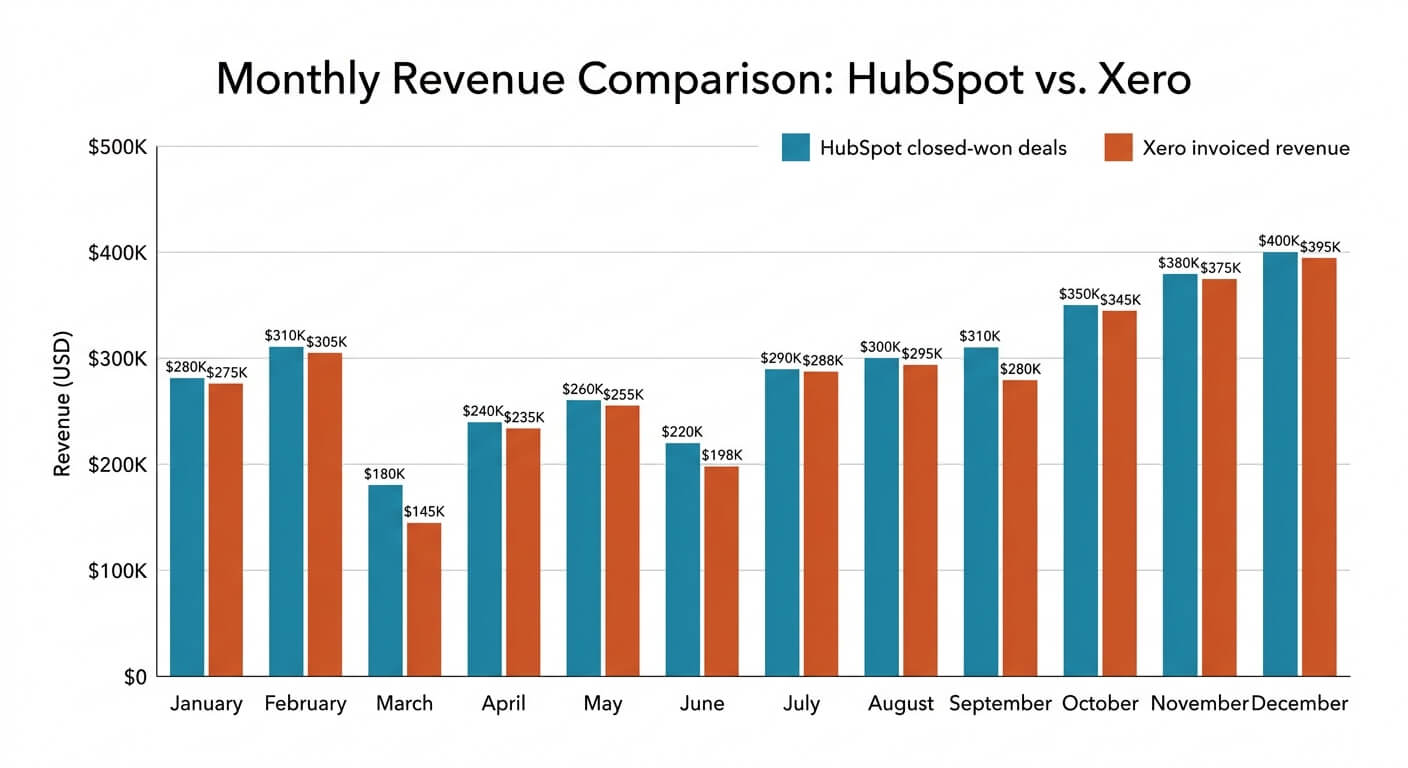
A business owner once showed us a $6,000 gap between their Stripe dashboard and their accounts. Nothing had been stolen. Their checkout worked perfectly every single time.
The problem was everything after the payment. Refunds, failed retries and foreign exchange fees never reached the bookkeeping. Somebody was patching it by hand each month, badly.
That is the real story of payment api integration in most small businesses. Taking the money is the easy bit. Keeping the data straight afterwards is where the cost hides.
Connecting your checkout, orders and accounts to a provider’s API is quick to start and hard to finish. REST APIs account for 65% of payment API implementations, according to DataHorizzon Research. The genuine work sits in webhooks, refunds, failed charges and reconciliation, not in the button your customer clicks.
The Myth: Payment API Integration Is a Weekend Job
A payment API is a set of instructions that lets your systems talk to a payment provider automatically. Adding a hosted checkout takes hours. Building the surrounding logic for refunds, disputes, partial payments and failed cards takes weeks. In our experience, the ratio is roughly one day of checkout work to ten days of everything else.
The myth persists because the demos are excellent. Stripe, PayPal and GoCardless all publish clean documentation and copy-paste code. You can be taking card payments before lunch.
Then reality arrives. A customer pays twice. A subscription card expires. A refund gets issued from the provider dashboard instead of your system. Suddenly your order records and your bank statement tell two different stories.
The questions nobody asks upfront
Before you write any code, answer these:
- What happens when a payment succeeds but your server is offline?
- Who issues refunds, and where does that refund get recorded?
- How do provider fees reach your accounting software?
- What does a customer see when a card is declined at 11pm?
If you cannot answer all four, you are not ready to build. You are ready to map. We always map the process before automating it, because automating a broken payment process just creates faster chaos.

The Reality: Payments Are a Data Problem
Payment APIs are increasingly used across the global financial system to move payment data efficiently, according to the Bank for International Settlements. That framing matters for small businesses too. A payment is not one event. It is a chain of records that must land in your orders, your accounts and your customer history, consistently, every time.
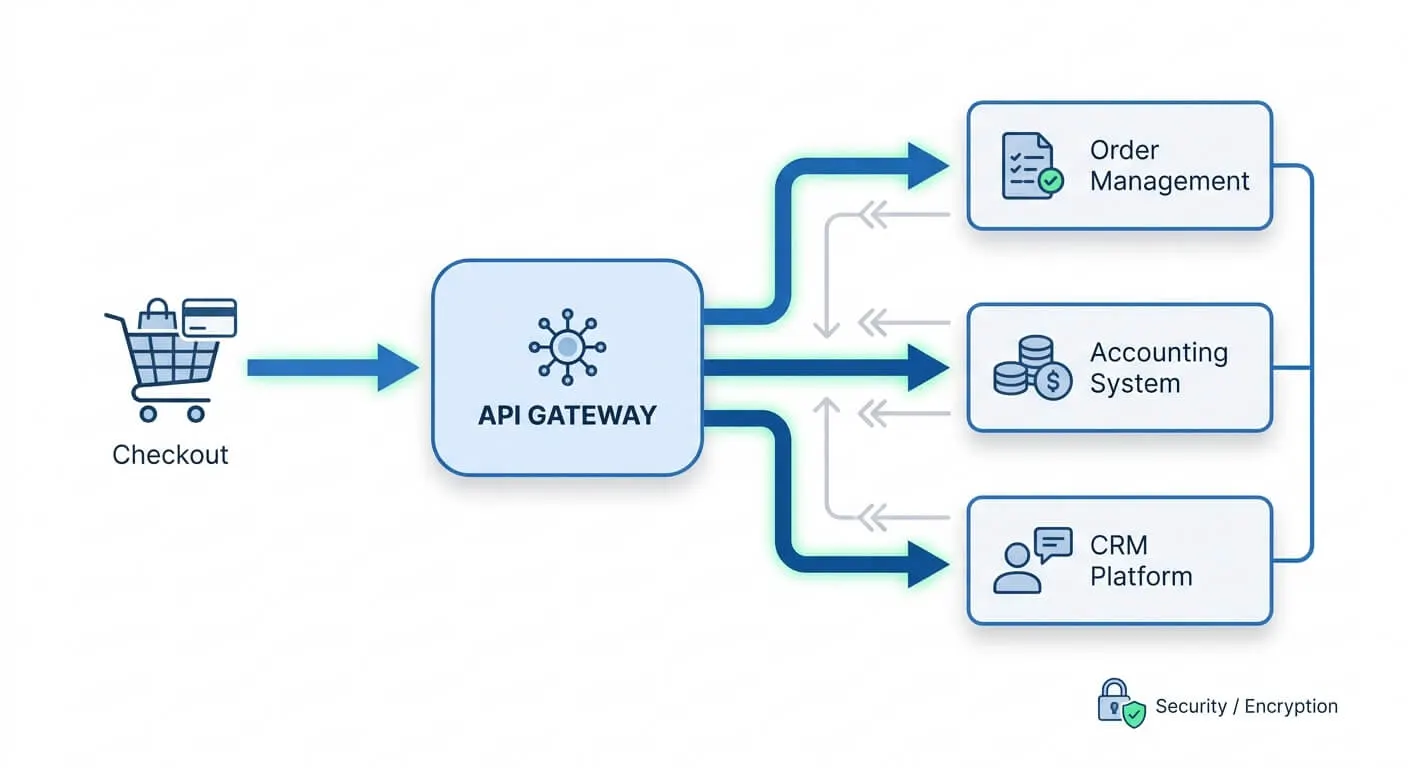
Think about what a single $250 order actually creates. A charge. A fee. An order record. An invoice. A customer record update. Possibly a stock adjustment and a delivery trigger.
Miss one link and someone rebuilds it manually later. That is how a typical small business ends up losing 8 to 10 hours a week to admin. Payment reconciliation is one of the biggest offenders we see.
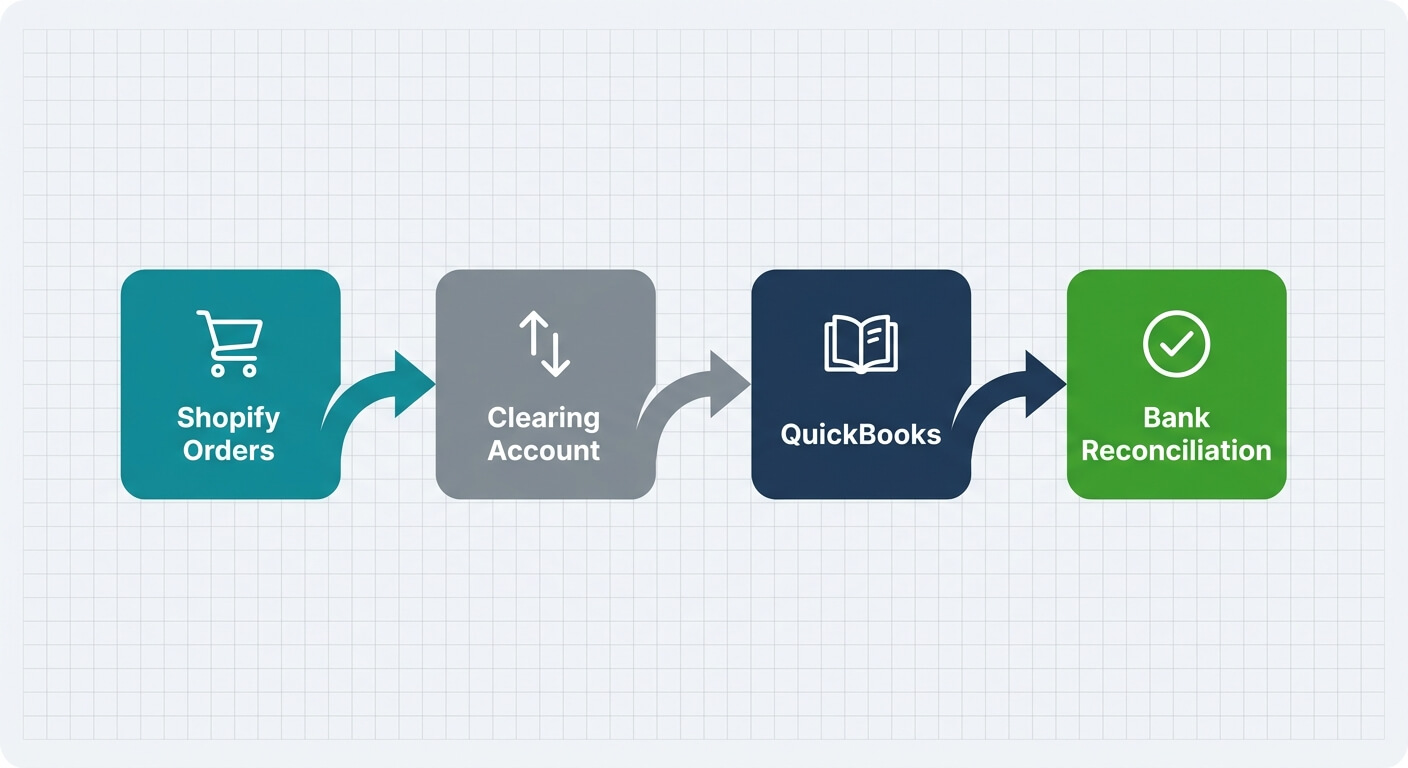
The fix is not a better checkout. It is treating payments as part of your wider data flow, the same way you would when linking accounting and sales systems.
Myth Two: More Payment Options Means More Revenue
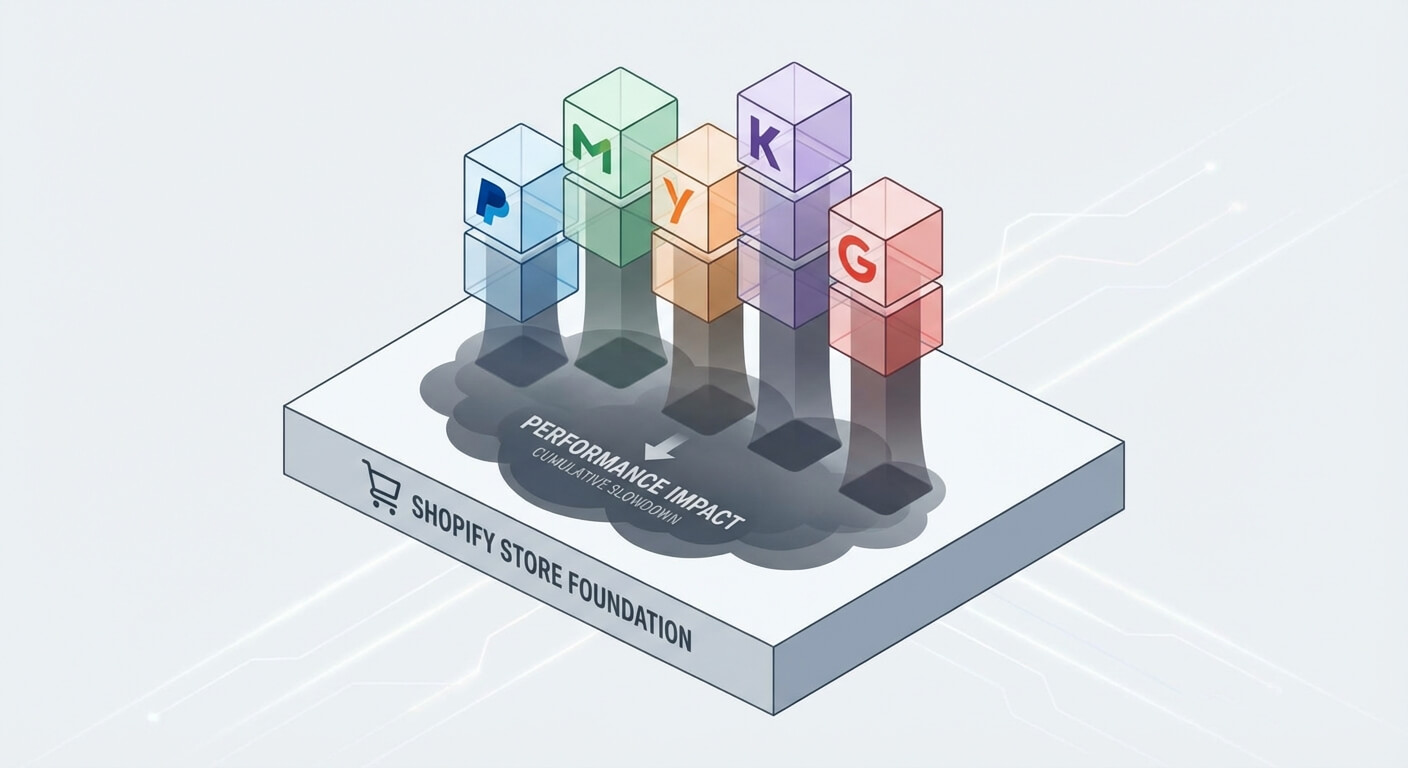
Adding a second or third payment provider rarely lifts conversion as much as owners expect. It reliably multiplies your reconciliation work. Each provider brings its own fee structure, settlement timing, refund rules and webhook format. Two providers means two sets of edge cases and two chances for your accounts to drift out of line.
There is a real case for adding providers. If a genuine chunk of your customers want direct debit, or bank transfer, or a local wallet, then add it. Just add it deliberately.
What we see more often is drift. A card processor for the website. A separate link-based tool for invoices. A third for subscriptions. Nobody chose that setup. It accumulated.
This is subscription sprawl wearing a different hat. Each tool has a monthly fee, a login and a data silo. Consolidating to one or two providers usually saves more money than the extra conversion ever earned.

Where Payment API Integrations Break in Practice
Webhooks are the most common failure point. A webhook is a message the payment provider sends your system when something happens, such as a successful charge or a chargeback. If your system misses that message, the money moves but your records do not. Providers retry, but only for a limited window, so silent failures are common.
Here are the breakages we see most often.
Missed webhooks. Your server was down for four minutes during a deployment. Six orders never got recorded. Nobody noticed until a customer complained.
No idempotency. The same webhook arrives twice and creates two orders. The customer gets charged once and shipped twice.
Fees ignored. You recorded $250 revenue. The bank received $242.60. Your reconciliation never balances.
Refunds outside the system. Someone refunds a customer from the provider dashboard. Your CRM still shows an active, paid customer.
Currency assumptions. Multi-currency settlement lands in your account at a different rate than the sale. Small amounts, endless confusion.
Every one of these is solvable. None of them appear in a quick-start guide.
Should You Build It or Buy a Connector?
Most small businesses do not need custom payment code. Off-the-shelf connectors between Stripe, Shopify, Xero and QuickBooks cover the standard cases well. Custom work earns its place when your pricing, billing or approval rules are genuinely unusual. If your process fits a template, use the template and spend the saved budget elsewhere.
Here is how we judge it.
Use a native connector when
Your setup is standard. One provider, one store, one accounting package. Native integrations handle fees, refunds and payouts sensibly, and someone else maintains them.
Use an automation platform when
You need to join systems that do not talk natively. Zapier is the fastest route, but its per-task pricing punishes growth, and payment events are high volume. n8n has a steeper learning curve. In exchange you get control, the option to self-host, and room to scale without your bill tracking your order count.
Self-hosting swaps subscription fees for maintenance responsibility. That is a fair trade for many businesses, but only if someone owns it.
Write custom code when
You have usage-based billing, split payments to suppliers, staged deposits or complex tax rules. This is also the point to bring in help with system integration rather than experimenting live with customer money.
The honest version of this decision is covered further in our guide to building versus buying automation.

A Sequence That Actually Works
Start with reconciliation, not the checkout. Get payouts, fees and refunds landing correctly in your accounts first, then automate order flow, then customer communication. Businesses that build in that order find their errors early, while volumes are low and mistakes are cheap to fix.
A practical order of work:
- Map the money. Every payment type, every refund path, every fee.
- Connect payouts to accounting. Match the bank feed before anything else.
- Handle webhooks properly. Log every event, retry failures, ignore duplicates.
- Automate the order flow. Fulfilment, invoicing, CRM updates.
- Add customer messaging last. Receipts, failed payment notices, dunning emails.
Keep a human in the loop for anything a customer feels. Automated retries and receipts are fine. A message about a failed payment on a $12,000 invoice deserves a person’s judgement.
Once payments are clean, invoicing usually follows. Many of the same rules apply when you are removing invoicing bottlenecks.
What This Means for Your Business
The payment API market is growing fast, forecast to rise from roughly $18.4 billion in 2024 to $42.7 billion by 2033, per DataHorizzon Research. Adoption is broad at institutional level too, with 93% of surveyed fast payment systems planning API use, according to CPMI research.
None of that helps if your own records are wrong. Good payment api integration is measured in one number: how many minutes a month you spend fixing payment data by hand. If that number is above zero and growing, the plumbing needs attention before the checkout does.
Frequently Asked Questions
How long does it take to connect a payment API to my systems?
A basic hosted checkout takes a day or two. A full connection covering refunds, fees, webhooks and accounting typically takes two to six weeks for a small business. The variable is not the code. It is how many payment scenarios your business actually has.
Can I use Zapier or n8n instead of hiring a developer?
Yes, for most standard setups. Both handle payment webhooks, order creation and accounting updates well. Zapier is quicker to learn but charges per task, which gets expensive at volume. n8n takes longer to learn and gives you more control, including self-hosting.
What is the difference between a payment gateway and a payment API?
The gateway is the service that authorises and processes the card transaction. The API is the interface your software uses to talk to it. Most providers sell both together. You choose the gateway for cost and coverage, and you live with the API daily.
Do I need to worry about PCI compliance?
Yes, but less than you might fear. If you use a hosted checkout or the provider’s payment fields, card details never touch your servers, which keeps your compliance burden light. It only becomes complex if you handle raw card data yourself. Almost no small business should.