Xero and HubSpot Integration: Fixing Revenue Reports That Don't Match
A practical guide to how to connect Xero and HubSpot for accurate revenue reporting, using field mapping, a shared key and weekly reconciliation checks.
Contents
Connect the two by syncing HubSpot deals to Xero invoices using a shared customer identifier, then pulling invoice status and payment data back into HubSpot deal properties. Xero owns invoiced and paid revenue. HubSpot owns pipeline and forecast. A weekly reconciliation check catches the rest. Most SMBs can build this in two weeks.
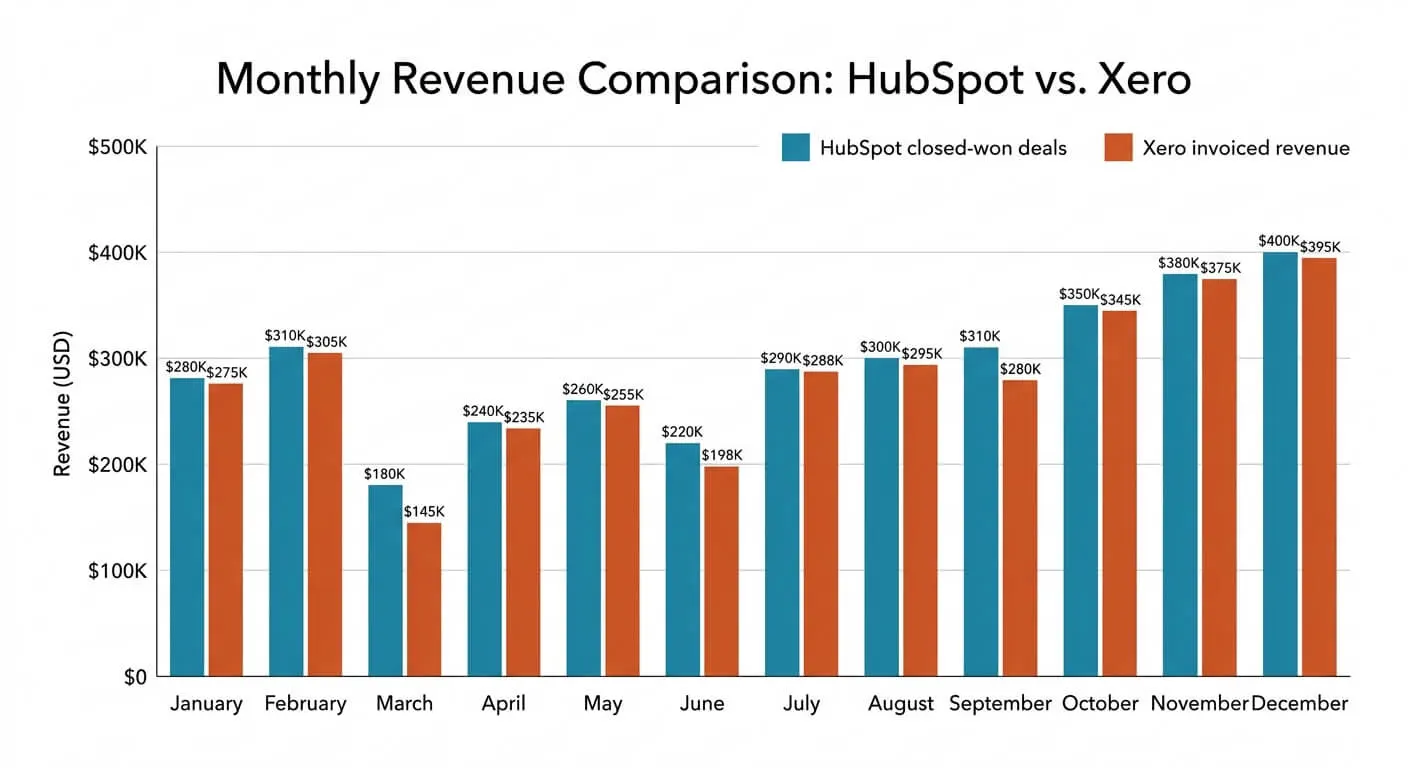
A sales team celebrates a $562,000 half-year. The accountant reports $518,100. Both are looking at real data. Both are right.
The gap isn’t fraud or sloppiness. It’s two systems counting two different things, at two different moments, with nobody in charge of the difference. Working out how to connect Xero and HubSpot for accurate revenue reporting starts with that problem, not with the software.
HubSpot and Xero can absolutely tell the same story. But only if you decide, in advance, which system owns which number.
Why Your CRM and Your Accounts Never Quite Agree
Revenue recognition is the point at which a sale officially counts as income. HubSpot records revenue when a deal is marked closed-won. Xero records it when an invoice is raised, or when it’s paid, depending on your accounting basis. Those events can sit weeks apart, so the same sale lands in two different months.
That timing gap is the biggest single cause of mismatched numbers. But it’s rarely the only one.
Here are the usual culprits I find when auditing a client’s reporting:
- Deposits and staged billing. One $40,000 deal becomes three invoices across two quarters.
- Tax treatment. HubSpot deal values are often entered gross. Xero reports net of sales tax or VAT.
- Credit notes and refunds. Xero knows about them. HubSpot almost never does.
- Closed-won deals that were never invoiced. More common than anyone admits.
- Currency. Two systems, two exchange rate dates, two totals.

None of these are integration problems. They’re definition problems. Automation will happily copy a bad definition into a beautiful dashboard, which is why I insist on settling this first.
The MATCH Framework for Joining the Two Systems
MATCH is a five-step method for integrating a CRM with accounting software: Map, Agree, Translate, Check and Hand off. Each step removes one class of reporting error. Businesses that follow the order rarely rebuild later, because the data model is settled before a single automation goes live.
It’s deliberately unglamorous. That’s the point.
M: Map the money path
Draw the actual journey of one sale, from enquiry to cash in the bank. Every stage, every handover, every person who touches it. You’ll find steps nobody documented and at least one spreadsheet nobody mentioned.
I’ve learned this the hard way. Automating a broken process just creates faster chaos, and mapping often reveals the real problem was the process itself. The TRACE method for process mapping walks through how to do this in an afternoon.
A: Agree one owner for every number
Pick a single system of record for each figure, and write it down.
Xero owns invoiced revenue, payments received, credit notes, tax and outstanding balance. HubSpot owns pipeline value, forecast, deal owner, lead source and close date. Nothing is owned by both. When two systems can both edit the same field, they will, and you’ll spend Friday afternoons working out which one lied.

T: Translate the fields
Matching on company name is the most common mistake I see. ‘Acme Ltd’, ‘Acme Limited’ and ‘ACME’ will create three customers in Xero and wreck your reporting inside a month.
Use a shared key instead. Store the Xero ContactID as a custom property on the HubSpot company record, and match on that every time. Then map your fields explicitly: deal amount to invoice subtotal (net of tax), currency to currency, close date to invoice date.
C: Check with a reconciliation loop
Build a scheduled job that compares closed-won deal totals against invoiced totals for the same period. Anything that doesn’t match goes onto an exception list.
Send that list somewhere a human actually looks: a Slack channel, or a Monday morning email. A three-line exception report beats a perfect dashboard nobody trusts.
H: Hand off anything that needs judgement
Don’t let a workflow issue invoices on its own. Have it create a draft invoice in Xero, populated and ready, then notify the person who approves billing.
This is my general position on automation. Take people out of repetitive internal work, but leave a person in charge of anything the customer feels or that needs judgement. Invoicing is both.
How to Connect Xero and HubSpot for Accurate Revenue Reporting, Step by Step
A working integration needs three flows: customer records moving from HubSpot into Xero, invoice and payment data coming back into HubSpot deal properties, and a scheduled reconciliation check. In my experience a typical small business loses 8 to 10 hours a week to manual admin, and rebuilding revenue reports by hand is often a big slice of it.
Here’s the build order I use.
1. Create the custom properties in HubSpot. On the deal object, add: Xero Invoice Number, Invoice Status, Invoice Date, Amount Invoiced, Amount Paid and Outstanding Balance. On the company object, add Xero ContactID.
2. Backfill the ContactID. Export your Xero contacts, match them to HubSpot companies once, by hand if you must, then import. This is boring and it’s the single highest-value hour of the project.
3. Trigger on stage change, not on time. When a deal moves to closed-won, create a draft invoice in Xero using the deal line items. Attach the invoice number back to the deal record immediately.
4. Sync payment status back. Set the workflow to update the HubSpot deal whenever the Xero invoice status changes to authorised, paid, voided or credited. Now your sales team can see who has actually paid.
5. Build the reconciliation report. A weekly comparison of closed-won value versus invoiced value, split by month and deal owner.
6. Test on historical data before going live. Run the workflow against last quarter’s closed deals in a sandbox and compare the output to your real accounts. My guide to testing workflows before launch covers the stages worth working through.
Choosing the Connector: Native App, Zapier or n8n
Marketplace connectors between accounting and CRM platforms typically handle contact sync well and invoice logic badly. They’re built for the average case, and revenue reporting problems live in the exceptions: part payments, credit notes, multi-currency deals. Custom conditions almost always need a proper automation platform behind them.
Native or marketplace apps are the fastest start. Use one if your billing is simple, one invoice per deal, one currency, no staged payments.
Zapier is genuinely easy and good for a first build. The catch is per-task pricing. Every invoice, every payment update and every reconciliation row burns a task, so costs climb exactly as you grow. My piece on linking CRM and accounting for seamless data flow covers the wider pattern.
n8n has a steeper learning curve but gives you control, the option to self-host and room to scale on one system. For anything involving conditional invoice logic, it’s usually the better long-term home. See my n8n guide for small businesses if you’re weighing it up.
The counterintuitive bit: the cheapest tool often produces the most expensive integration, because you end up patching around its limits with manual work.
Keeping the Numbers Accurate After Go-Live
An integration is not a finished object. Products change, tax rules change, and someone will invent a new deal stage in month three without telling anyone.
Check three things monthly. Are there closed-won deals with no invoice number? Are there Xero invoices with no matching deal? Does last month’s total still match after credit notes?
Get those three right and your board pack stops being an argument. If the wider stack is the issue rather than these two tools alone, my work on linking CRM and accounting for clean data flow and my system integration service go further.
The real answer to how to connect Xero and HubSpot for accurate revenue reporting isn’t a connector at all. It’s a set of agreed definitions, a shared identifier, and a weekly check that a human reads. The software is the easy part.
Frequently Asked Questions
Can I sync Xero and HubSpot without paying for a connector?
Yes, if you’re comfortable building it. Both platforms have open APIs, and a self-hosted n8n instance costs only server time, roughly $10 to $20 a month. You swap subscription fees for maintenance responsibility, so budget a few hours a quarter to keep it healthy.
Should HubSpot deal values include sales tax or VAT?
Exclude it. Record net values in HubSpot so deal amounts line up with the invoice subtotal in Xero. If your team currently enters gross figures, fix that convention before you build anything, otherwise every report will be wrong by your tax rate.
How do I handle deals that get invoiced in stages?
Create a one-to-many relationship. Keep the deal value as the total contract amount, then store each Xero invoice against the deal with its own amount and date. Report on invoiced value by month, not deal value, so staged billing shows up in the right period.
How long does a Xero and HubSpot integration take to build?
For a straightforward setup, expect two to three weeks. Roughly one week for mapping and agreeing definitions, a few days for the build, and a week of parallel running against your real accounts. The mapping stage is the one people rush and later regret.