Linking CRM and Accounting for Seamless Data Flow
Connect your CRM and accounting systems for seamless data flow. Eliminate duplicate entry, improve accuracy, and gain complete customer insights with proper integration.

Contents
A disconnected CRM and accounting system costs real time and money: up to 60% more data entry errors, and an average 15 administrative hours lost every week to manual reconciliation that linked systems remove entirely. Integration platforms themselves run $25 to $200 a month.
The Cost of Disconnected Systems
Every small business reaches the same frustrating point. You’re running your customer relationships through one system, managing your finances through another, and spending hours each week moving the same information between them. Your CRM knows who bought what and when, but your accounting system treats them as anonymous invoice numbers. Your accounts know the money came in, but have no context about the customer journey that created it.
This disconnect costs more than just time. Integrating CRM and accounting systems helps businesses reduce data entry errors and save time on administrative tasks. Yet many small businesses continue operating with systems that don’t communicate, creating unnecessary friction in their daily operations.
This pattern repeats across the small businesses I work with. The business grows, new systems get added to handle specific needs, but nobody considers how they’ll work together. Before long, you’re maintaining the same customer information in three different places, each with slightly different details, none of them complete.
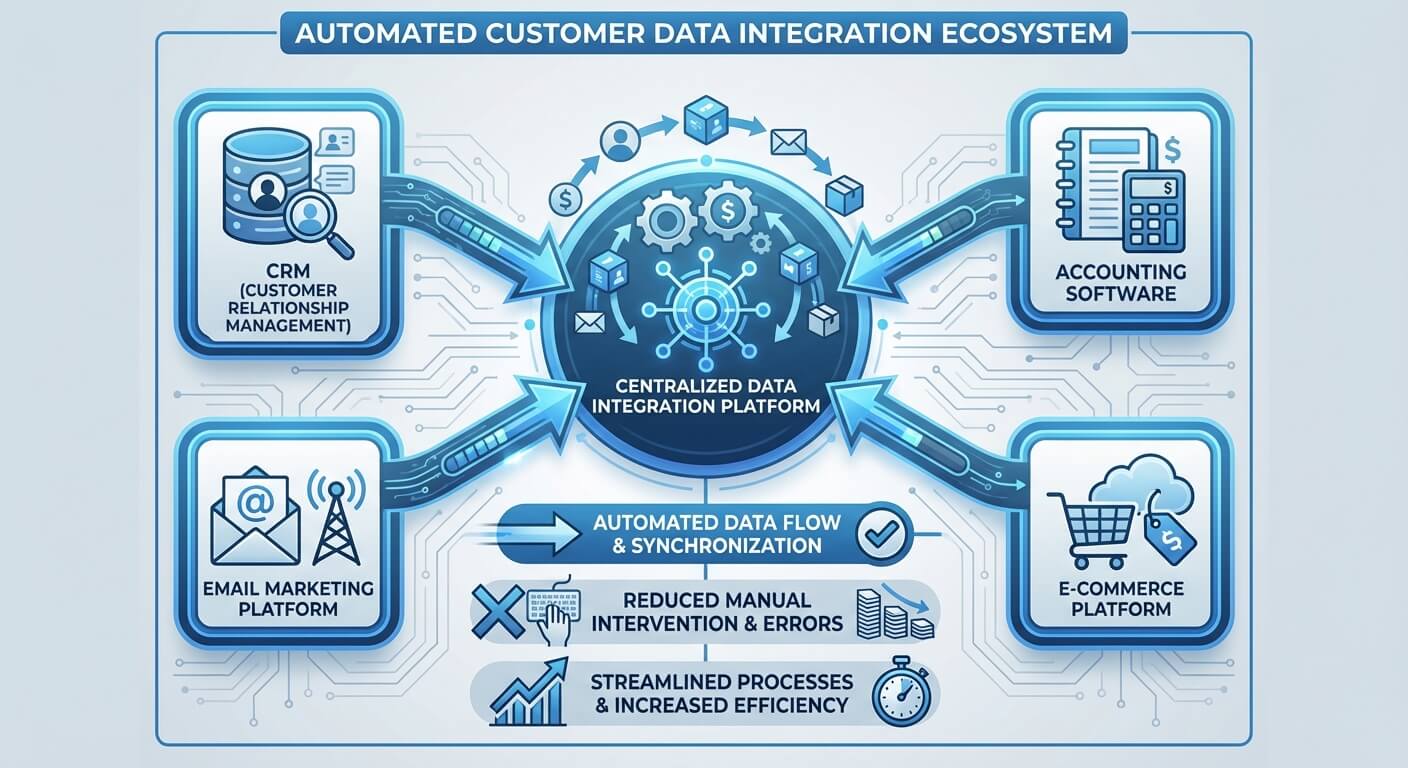
The solution isn’t necessarily replacing everything you’ve got. Often, it’s about creating the right connections between systems that already serve you well. When your CRM and accounting software can share information automatically, you eliminate duplicate work and gain insights that neither system could provide alone.
Understanding Your Current Data Flow
Before you can improve your data flow, you need to understand how information currently moves through your business. Most small businesses have developed workarounds that feel normal until you examine them closely.
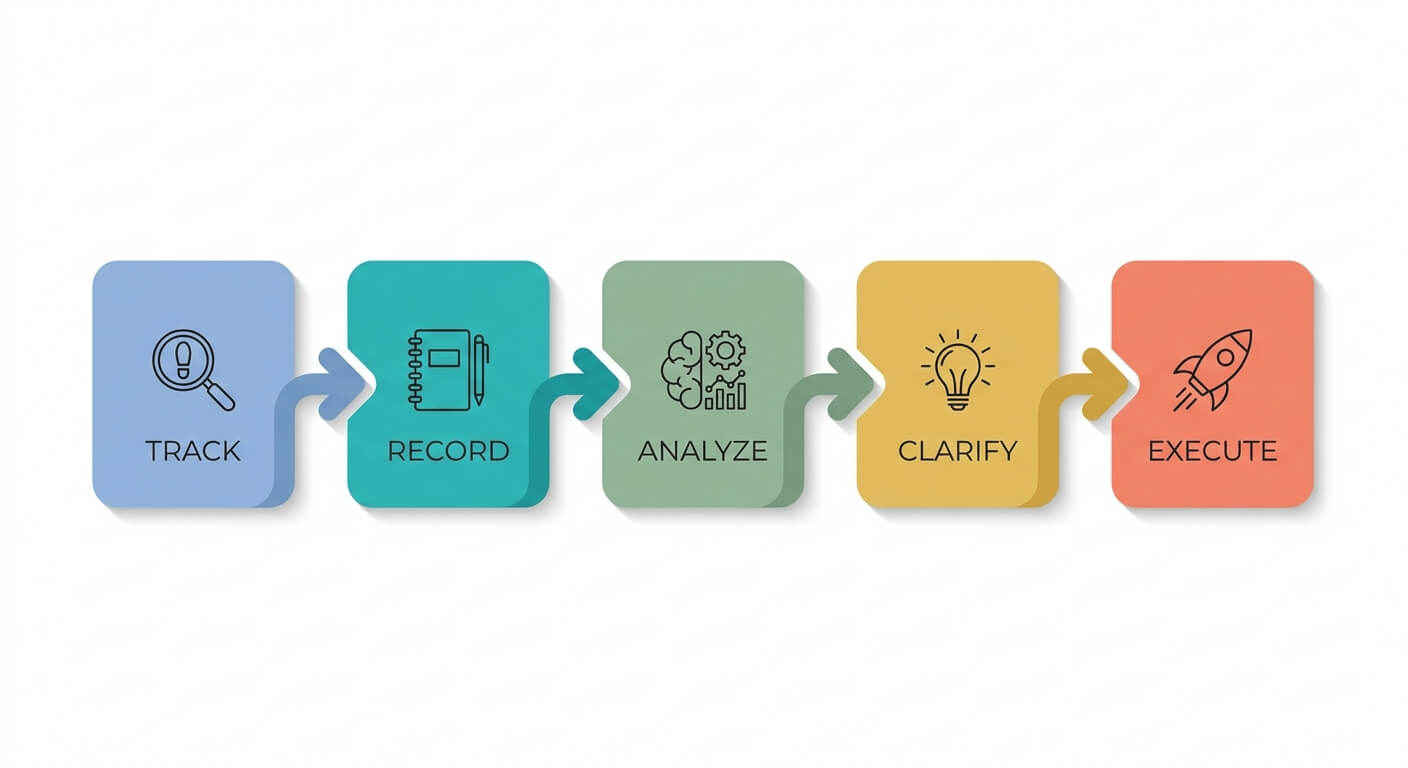
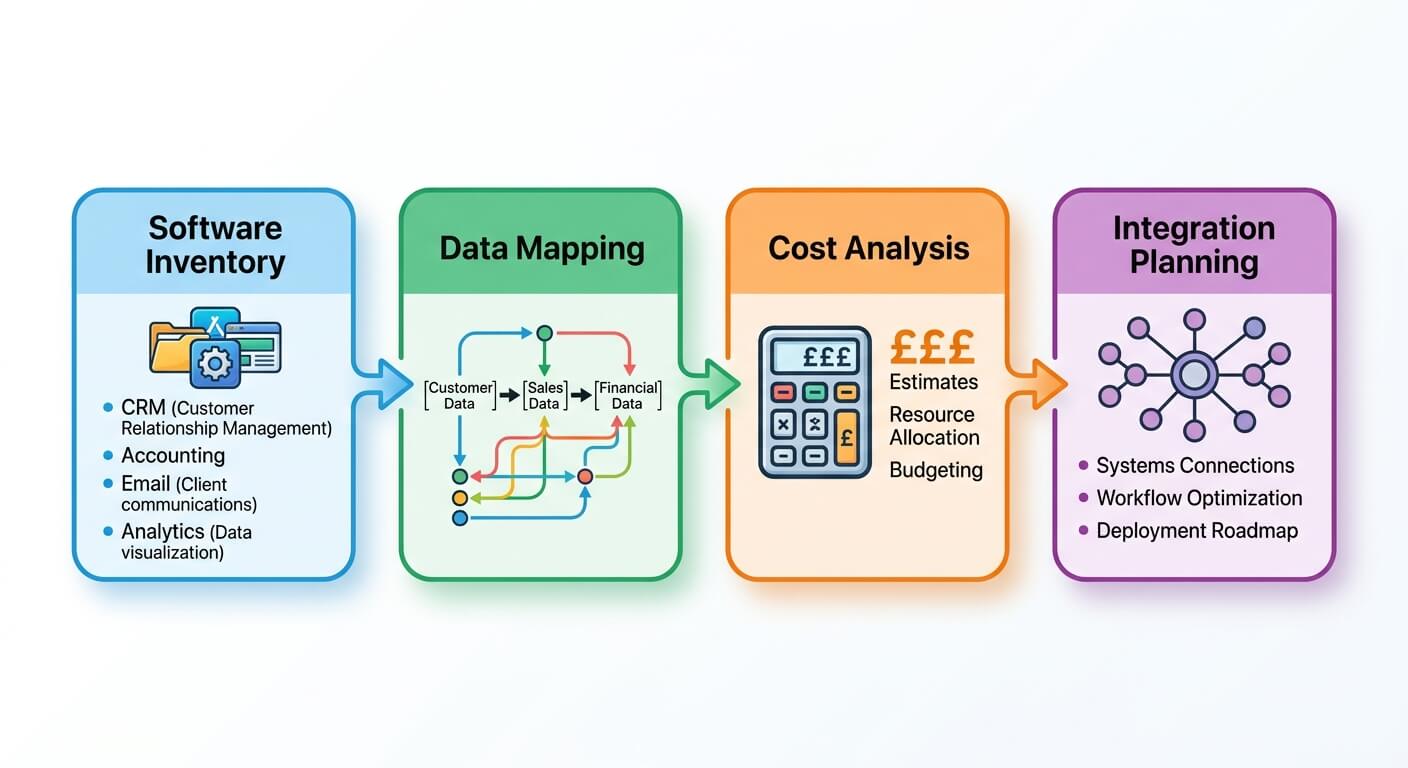
Start by tracking a single customer transaction from initial enquiry through to payment. Where does the customer’s information first get recorded? How many times does someone manually enter their details into different systems? When they place an order, how does that information reach your accounts? If they have a support query six months later, can you quickly see their complete purchase history?
This exercise often reveals surprising complexity. A customer might first appear in your email marketing system when they download a resource, then get manually added to your CRM when they enquire about services, have their details typed again when you create an invoice, and exist as a completely separate entry in your accounting system when they pay.
Each manual transfer introduces opportunities for errors and inconsistencies. Phone numbers get transposed, company names get abbreviated differently, addresses become incomplete. More importantly, each system only holds part of the story, making it difficult to understand your customer relationships fully.
Consider the weekly routine many business owners know well: exporting data from your CRM, reformatting it in spreadsheets, then importing it into your accounting system. This process might take two hours every Monday morning, but it’s become so routine that you don’t question whether there’s a better way.
Common Integration Challenges
Connecting CRM and accounting systems sounds straightforward in principle but presents practical challenges that catch many businesses off guard. The most common assumption is that all software systems are designed to work together seamlessly. The reality is more complex.
Different systems often use different data formats and field structures. Your CRM might store customer names as a single field, whilst your accounting system expects separate first and last name fields. Addresses, phone numbers, and product codes might follow different formatting rules in each system. These seemingly minor differences can create significant obstacles to smooth data transfer.
Timing presents another challenge. Your CRM updates in real-time as your sales team adds notes and changes deal stages, but your accounting system might only process updates once per day. If a customer changes their billing address on Tuesday afternoon, when does that change reach your invoice system? Without proper synchronisation, you might send invoices to old addresses or miss important customer updates.
Data ownership becomes complicated when systems share information. If a customer’s credit limit gets updated in your accounting system, should that automatically update their status in your CRM? If your sales team changes a customer’s industry classification, should that affect how they’re categorised for accounting purposes? These decisions seem technical but have real implications for how your team works.
Permissions and access controls add another layer of complexity. Your sales team needs access to customer contact information and purchase history, but shouldn’t necessarily see detailed financial data. Your accounts team needs complete transaction records but might not need access to sales pipeline information. Creating the right level of access whilst maintaining data consistency requires careful planning.
Benefits of Seamless Integration
When CRM and accounting systems work together properly, the benefits extend far beyond saving time on data entry. You gain a complete view of each customer relationship that transforms how you understand and serve your market.
Customer lifetime value becomes visible in ways that individual systems can’t provide. Your CRM knows how many meetings it took to close each deal and which marketing campaigns generated the best leads. Your accounting system knows which customers pay promptly, order regularly, and generate the highest margins. Combined, this information reveals which types of customers are most valuable to acquire and retain.
Cash flow forecasting becomes more accurate when you can correlate CRM pipeline data with historical payment patterns. Instead of guessing when deals might close, you can analyse how similar opportunities have developed in the past. If enterprise customers typically take 90 days to pay whilst small businesses pay within 30, you can plan your cash flow accordingly.
Customer service improves when support teams can see complete interaction history. When a customer calls with a billing query, your team can see their recent purchases, support tickets, and payment history in one place. This context enables more helpful, personalised service without transferring calls between departments.
Reporting capabilities expand significantly when data from both systems combines. You can identify which marketing channels generate customers with the highest lifetime value, track how customer satisfaction scores correlate with payment behaviour, or analyse seasonal patterns across sales and financial metrics.
Automated workflows become possible between systems. New customers added to your CRM can automatically generate accounting records with appropriate credit terms. Won deals can trigger invoice creation with accurate customer details and pricing. Payment receipts can update deal stages and trigger follow-up sequences in your CRM.
Technical Approaches to Integration
Connecting CRM and accounting systems requires choosing the right technical approach for your specific situation. The complexity and cost of different solutions vary significantly, and what works well for one business might be unnecessarily complicated for another.
Native integrations represent the simplest option when available. Many popular CRM and accounting systems offer built-in connections that require minimal setup. These integrations typically handle the most common data synchronisation needs: customer information, invoices, and payments. The limitation is that you’re constrained to whatever functionality the software providers have chosen to include.
Third-party integration platforms like Zapier, Microsoft Power Automate, or Integromat provide more flexibility without requiring custom development. These platforms offer pre-built connectors for hundreds of business applications and allow you to create automated workflows between them. You might set up a workflow that creates an accounting customer record whenever a CRM deal reaches “closed-won” status, or updates customer credit limits in your CRM when payment patterns change.
API-based custom integrations offer the most flexibility but require technical expertise to implement and maintain. This approach makes sense when you have specific requirements that standard integrations can’t meet, or when you’re working with less common software systems. Businesses with custom integrations typically see greater efficiency gains than those using standard connectors, but they also require ongoing technical maintenance.
Middleware solutions sit between your systems and manage data transformation, error handling, and synchronisation. This approach works well for businesses with complex requirements or multiple systems that need to interconnect. The middleware handles the technical complexity whilst providing business users with straightforward configuration options.
Choosing the right approach depends on factors including your technical resources, budget, specific requirements, and long-term growth plans. A simple native integration might meet your needs perfectly, or you might require a more sophisticated solution that can accommodate future expansion.
Implementation Planning
Successful CRM and accounting integration requires careful planning before any technical work begins. The integration itself is just one part of a broader process that includes data preparation, staff training, and workflow redesign.
Data cleaning should happen before integration, not after. Export customer records from both systems and identify duplicates, inconsistencies, and incomplete records. Customers might exist under slightly different names in each system, or have outdated contact information that needs updating. Addressing these issues before integration prevents them from multiplying across connected systems.
Field mapping requires decisions about how information will be structured in the integrated environment. If your CRM tracks customers by company name but your accounting system uses customer codes, you need to establish consistent naming conventions. Product descriptions, tax categories, and customer classifications need standardisation across both systems.
Workflow changes will be necessary as manual processes become automated. Staff who currently spend time transferring data between systems will need new responsibilities. Sales teams will need to understand how their CRM updates affect accounting records. Accounts teams will need to know how their changes impact customer records that sales teams rely on.
Testing should happen with a small subset of data before rolling out full integration. Select a few customer records and process them through the complete integrated workflow. Verify that information flows correctly in both directions and that automated processes trigger as expected. This testing phase often reveals edge cases that weren’t apparent during planning.
Training needs extend beyond just learning new procedures. Staff need to understand how their work affects other departments when systems are connected. Sales team updates might trigger accounting processes, and accounting changes might affect sales reporting. This interconnectedness requires more careful data management than isolated systems.
Maintaining Data Quality
Once your CRM and accounting systems are connected, maintaining data quality becomes more critical and more complex. Errors that might have been contained within a single system can now propagate across your entire business process.
Data validation rules should be established before information enters either system. Phone numbers should follow consistent formatting, addresses should be complete and standardised, and customer categories should use predefined values rather than free text. These rules prevent inconsistencies that become difficult to resolve once data has synchronised across multiple systems.
Regular audits help identify issues before they become widespread problems. Monthly reviews might include checking for duplicate customer records, verifying that financial totals match between systems, and confirming that automated workflows are triggering correctly. Businesses that conduct regular data audits tend to maintain higher data accuracy than those relying solely on automated validation.
Access controls become more important when systems share data. Staff should have appropriate permissions for their role without the ability to make changes that could disrupt integrated processes. Sales teams might need read-only access to payment information, whilst accounts teams might not need to modify sales pipeline data.
Error handling procedures should be documented and understood by relevant staff. When synchronisation fails or data conflicts arise, someone needs to know how to identify and resolve the issue quickly. These procedures should include steps for manually correcting data whilst maintaining consistency across both systems.
Backup and recovery processes need to account for integrated systems. If you need to restore data from backups, both systems need to be synchronised to the same point in time to avoid creating conflicts. This might require coordinating backup schedules or using integration platforms that maintain transaction logs.
Security and Compliance Considerations
Integrating CRM and accounting systems creates new security considerations that require careful attention. Data that was previously isolated in separate systems now flows between them, potentially expanding the impact of security breaches or compliance violations.
Data encryption should protect information both at rest and in transit. Customer financial information moving between your CRM and accounting systems needs the same level of protection as if it were being transmitted to external parties. This includes using secure connections for API calls and ensuring that integration platforms maintain appropriate security standards.
Access logging becomes more complex when systems share data. You need to track not just who accessed information, but which system they used and whether that access triggered updates in connected systems. This audit trail is essential for compliance requirements and security investigations.
GDPR and data protection regulations apply to integrated systems just as they do to standalone applications. When a customer requests data deletion, that request needs to be processed across all connected systems. Your integration should include procedures for handling these requests consistently.
Vendor security assessments should cover all components of your integrated environment. This includes not just your primary CRM and accounting software, but any integration platforms, middleware, or custom applications that handle your data. Each component represents a potential security risk that needs evaluation.
Incident response procedures should account for integrated systems. If a security breach affects one system, you need to quickly assess whether connected systems are also compromised. This might require temporarily disabling integrations to prevent the spread of security issues.
Measuring Success
Effective measurement helps you understand whether your CRM and accounting integration is delivering the expected benefits and where improvements might be needed. The metrics you track should reflect both operational efficiency and business outcomes.
Time savings are often the most immediately visible benefit. Measure how long staff previously spent on manual data entry, report generation, and information lookup tasks. After integration, track whether these activities take less time or whether staff can focus on higher-value work instead.
Data accuracy improvements can be measured by tracking error rates, duplicate records, and data inconsistencies. Compare the frequency of billing errors, incorrect customer information, and reconciliation discrepancies before and after integration. Improved accuracy should be visible in reduced customer complaints and fewer internal corrections.
Process efficiency metrics might include how quickly new customers can be set up across both systems, how long it takes to generate customer reports, and how frequently manual interventions are needed to resolve data issues. These measurements help identify whether automated processes are working as intended.
Business outcome metrics connect operational improvements to financial results. Customer lifetime value calculations become more accurate with integrated data. Sales forecasting should improve when CRM pipeline data combines with historical payment patterns. Customer service metrics might improve when support teams have access to complete customer histories.
User adoption rates indicate whether staff are embracing new integrated processes or finding workarounds that undermine the benefits. Low adoption might signal training needs, workflow problems, or technical issues that require attention.
Future-Proofing Your Integration
Business needs evolve, and your integration should be designed to accommodate future changes without requiring complete rebuilds. Planning for scalability and flexibility from the beginning saves time and money as your business grows.
Choose integration solutions that can handle increased data volumes as your customer base grows. What works for 500 customers might not scale effectively to 5,000 customers. Consider not just current performance, but projected growth over the next three to five years.
Plan for additional system connections beyond CRM and accounting. As your business grows, you might add e-commerce platforms, inventory management systems, or marketing automation tools. Your system integration approach should accommodate these future connections without disrupting existing workflows.
Document your integration architecture, including data flows, transformation rules, and business logic. This documentation becomes invaluable when you need to modify processes, troubleshoot issues, or onboard new team members. Without proper documentation, integrations can become fragile systems that nobody fully understands.
Regular reviews should assess whether your integration continues to meet business needs. As processes evolve and systems update, integration requirements might change. Quarterly reviews can identify opportunities for improvement or potential issues before they become problematic.
Vendor roadmaps matter when choosing integration solutions. Software providers regularly update their systems, and these updates can affect existing integrations. Choose solutions from vendors with clear development roadmaps and good track records for maintaining backward compatibility.
Getting Started
Implementing CRM and accounting integration doesn’t require a complete overhaul of your existing systems. The most successful approaches start small, prove value, and expand gradually.
Begin by identifying your highest-impact, lowest-risk integration opportunity. This might be automatically creating customer records in your accounting system when deals close in your CRM, or synchronising customer contact information between systems. Choose something that saves time immediately without disrupting critical processes.
Pilot your integration with a subset of customers or transactions. This limited scope allows you to test processes, identify issues, and refine workflows without affecting your entire business. A successful pilot builds confidence and provides a foundation for broader implementation.
Document your current processes before making changes. This documentation serves as both a baseline for measuring improvement and a fallback if you need to revert changes. Understanding exactly how work gets done today makes it easier to design better processes for tomorrow.
Involve your team in planning and implementation. The people who use these systems daily often have insights that aren’t apparent from a management perspective. They also need to understand and embrace new processes for integration to succeed.
Consider working with specialists who understand both the technical requirements and business implications of CRM and accounting integration. The initial investment in proper implementation pays dividends in reduced maintenance, fewer issues, and better outcomes.
Your CRM and accounting systems contain valuable information that becomes exponentially more useful when connected. The administrative burden of maintaining separate systems wastes time that could be spent serving customers and growing your business. Integration isn’t just about technical efficiency; it’s about creating the foundation for better customer relationships and more informed business decisions.
Frequently Asked Questions
How long does it typically take to integrate CRM and accounting systems?
Integration timelines vary considerably based on your specific requirements and existing systems. A simple native integration between popular platforms might be operational within a week, whilst more complex custom integrations involving data migration and process redesign can take several months. Most small businesses should expect 4-8 weeks for a complete implementation including planning, testing, and staff training. The key is starting with a pilot project that delivers quick wins, then expanding the integration gradually rather than attempting everything at once.
What happens to our existing data when we integrate systems?
Your existing data remains in place during integration, nothing is automatically deleted or overwritten. The integration process typically begins with data cleaning and deduplication, where you identify and resolve inconsistencies between systems before connecting them. During implementation, you’ll establish rules for how data synchronises between systems going forward. Historical data can be migrated gradually or left in place, depending on your needs. It’s essential to maintain backups of both systems before beginning integration and to test data flows thoroughly with a small subset before rolling out across your entire database.
Can we integrate systems if we’re using less common or industry-specific software?
Yes, though the approach may differ from standard integrations. Less common software platforms might not have pre-built integration options, but most modern business applications offer APIs (application programming interfaces) that enable custom connections. Third-party integration platforms like Zapier increasingly support niche software, or you might need custom development work to create the connection. Industry-specific software often includes integration capabilities designed for common accounting systems. The key is assessing your options early in the planning process and budgeting accordingly if custom development is required.
How do we maintain data security when systems are sharing information?
Security for integrated systems requires a multi-layered approach. Ensure all data transfers use encrypted connections (typically HTTPS or SSL), and verify that any integration platforms you use maintain appropriate security certifications. Implement role-based access controls so staff only see information relevant to their responsibilities. Regular security audits should cover all connected systems and the integration layer between them. Maintain detailed logs of data access and transfers for compliance purposes. When selecting integration tools, prioritise vendors with strong security track records and transparent security policies. Your integration should also include procedures for quickly disabling connections if security issues arise.
What are the ongoing costs and maintenance requirements for integration?
Beyond initial implementation costs, integrated systems require ongoing investment in several areas. Subscription fees for integration platforms typically range from $25-200 monthly, depending on data volumes and features. Budget for periodic reviews and updates as your business processes evolve or software vendors release updates. Staff training should be refreshed when processes change or new team members join. Data quality maintenance requires regular audits and occasional cleanup work. Custom integrations may need developer time for updates when either system changes. However, these costs are typically far lower than the value of time saved through automation.