How to Integrate Business Applications: A Small Business Guide to Breaking Down Data Silos
Learn how to integrate business applications and eliminate data silos. Practical steps for SMBs to connect tools, automate workflows, and boost efficiency.
Contents
For most small businesses, a combination of native integrations and an automation platform covers 90% of needs. Start simple. Add complexity only when necessary. Most SMBs spend $50 to $200 a month on integration platforms, with Zapier from $20 and self-hosted n8n free beyond hosting.
Your customer data lives in your CRM. Your invoices sit in accounting software. Your orders flow through e-commerce platforms. None of these systems talk to each other. Sound familiar?
Businesses that integrate their applications see 20-30% productivity gains according to McKinsey research. When you connect your tools, data flows automatically. Staff stop copying information between systems. Errors drop. Decisions happen faster. This guide shows you exactly how to make it happen.
Why Data Silos Cost More Than You Think
Data silos occur when information gets trapped in separate systems. Each department works with its own tools. Marketing uses HubSpot. Sales tracks deals in Salesforce. Finance runs everything through Xero. The problem? These systems don’t share information automatically.
According to Gartner, poor data quality costs organisations an average of $12.9 million annually. For SMBs, the impact scales down but remains significant. I have worked with businesses losing 10-15 hours weekly to manual data entry alone.
The hidden costs stack up quickly. Staff duplicate effort. Customer records become inconsistent. Reports require hours of spreadsheet wrangling. Worse, you make decisions based on incomplete information. A customer complaint might sit unresolved because support can’t see their purchase history.
Here’s what most business owners miss. The cost isn’t just wasted time. It’s missed opportunities. When your sales team can’t see which customers have overdue invoices, they might pitch upgrades to accounts about to churn. When marketing can’t access purchase data, campaigns target the wrong segments.
Understanding Application Integration Options
Application integration is the process of connecting separate software systems so they share data automatically. There are several approaches, each suited to different needs and budgets. Understanding your options helps you choose the right path.
Native integrations come built into your software. Shopify connects directly to Xero. HubSpot links to Salesforce. These work well for common tool pairings. They’re usually free or included in your subscription. The downside? Limited customisation and they only cover popular combinations.
Integration platforms like Zapier and n8n connect thousands of applications. You build automated workflows without coding. When a new order arrives in Shopify, Zapier creates an invoice in Xero automatically. These platforms handle the technical complexity. You focus on the business logic.
Custom integrations involve building connections from scratch using APIs. This approach offers maximum flexibility but requires development resources. For most SMBs, this is overkill. Save custom work for unique requirements that platforms can’t handle.
Middleware solutions sit between your applications and manage data flow. They’re powerful but complex. Enterprise companies use them extensively. SMBs rarely need this level of sophistication.
How to Audit Your Current Tech Stack
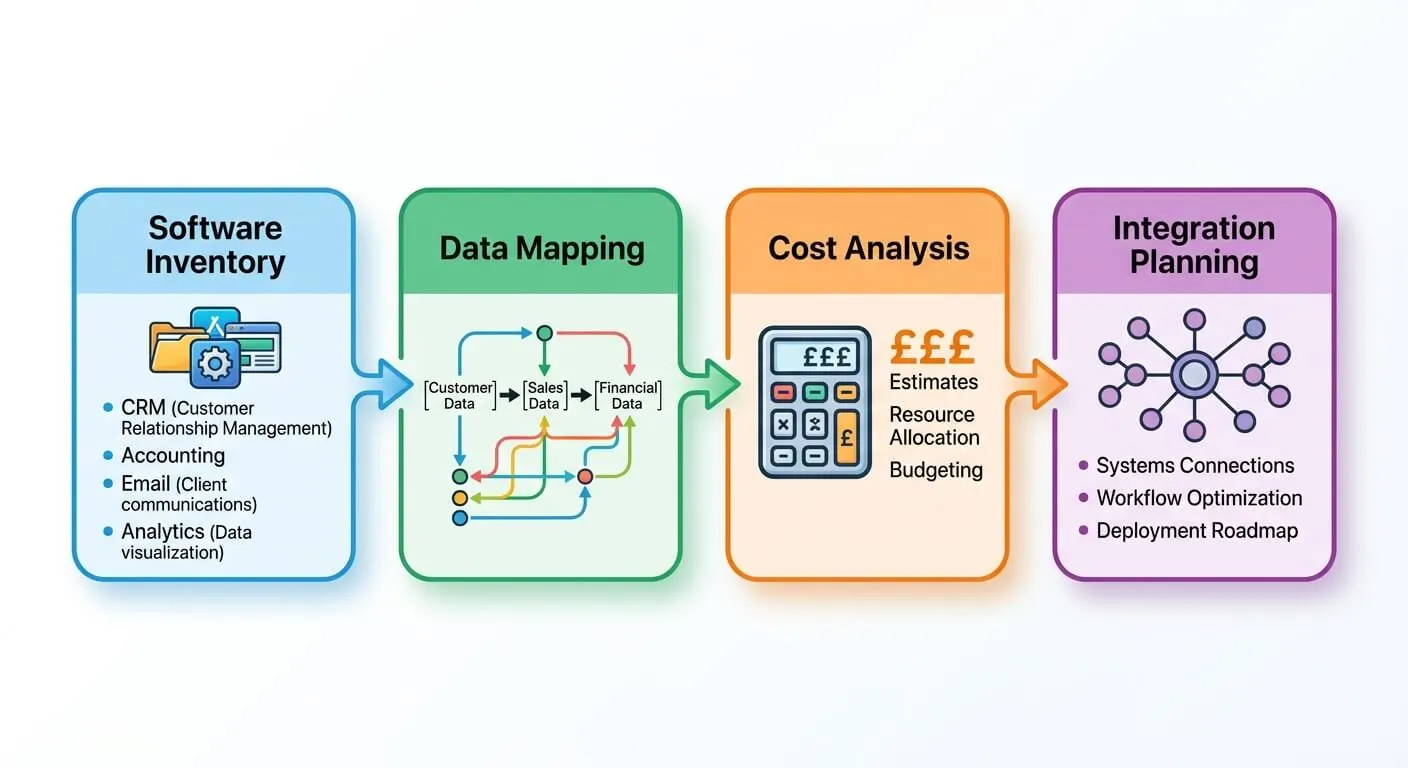
Before connecting anything, map what you have. Many businesses accumulate tools without tracking them properly. My tech stack audit checklist walks through this process in detail.
Start by listing every application your business uses. Include the obvious ones: CRM, accounting, email marketing. Then dig deeper. Project management tools. Communication platforms. Spreadsheets that act as databases. Payment processors. E-commerce platforms.
For each tool, document:
- What data it holds
- Who uses it and how often
- What manual processes connect it to other systems
- The subscription cost
This audit often reveals surprises. One retail client discovered they were paying for three different email tools. Another found critical customer data trapped in a spreadsheet nobody had updated in months.
Look for patterns in manual work. Where do staff copy data between systems? These touchpoints become your integration priorities. A five-minute task done fifty times weekly equals over four hours of recoverable time.
Building Your Integration Strategy Step by Step
Random integrations create chaos. You need a strategy. Here’s how to build one that actually works.
Identify High-Impact Connections First
Not all integrations deliver equal value. Prioritise based on time saved and error reduction. The connection between your CRM and accounting software typically offers the biggest win. Sales data flowing automatically into invoicing eliminates hours of manual work.
Rank potential integrations by:
- Frequency: How often does data move between these systems?
- Volume: How many records are involved?
- Error rate: How often do manual transfers create mistakes?
- Business impact: What breaks when this data is wrong?
Choose Your Integration Platform
For SMBs, Zapier or n8n can handle integration needs without custom development. Zapier offers the easiest learning curve with thousands of pre-built connections. It’s ideal if you want quick wins without technical complexity.
N8n provides more power and flexibility. It’s self-hosted, meaning your data stays on your servers. For businesses with strict data requirements, this matters. My n8n workflow automation guide covers setup in detail.
The choice depends on your needs. Simple integrations? Zapier. Complex workflows with custom logic? N8n. Many businesses use both.
Start Small and Expand
Resist the urge to connect everything at once. Pick one high-value integration. Get it working reliably. Monitor for a few weeks. Then add the next connection.
This approach catches problems early. A misconfigured integration can create duplicate records or sync bad data. Fixing one broken connection is manageable. Untangling five simultaneous failures is a nightmare.

Document Everything
When you leave a company, your integrations shouldn’t break. Document each workflow:
- What triggers it
- What data moves
- Where errors get logged
- Who to contact if it fails
This documentation saves hours when something goes wrong. It also s onboarding new staff much easier.
Common Integration Patterns That Work
Certain integration patterns solve problems for almost every SMB. These proven approaches work across industries.
CRM to Accounting Sync
When a deal closes in your CRM, an invoice should appear in your accounting software. No manual entry. No delay. This single integration often saves 5-10 hours weekly for sales-driven businesses.
My guide on linking CRM and accounting covers this in depth. The key is mapping fields correctly. Customer name, address, line items, and payment terms must transfer accurately.
E-commerce to Everything
Online stores generate data that multiple systems need. Orders feed into accounting. Customer details update your CRM. Inventory levels sync with suppliers. Shipping triggers tracking notifications.
The Shopify-Xero integration demonstrates this pattern. Each sale automatically creates matching financial records. Stock levels update in real-time. Returns process without manual intervention.
Marketing Automation Loops
Your marketing tools should react to what happens elsewhere. When a customer s their first purchase, they enter a welcome sequence. When support resolves a ticket, a satisfaction survey fires. When an invoice goes overdue, nurture campaigns pause.
These loops require connecting your marketing automation platform to CRM, support, and financial systems. The result? Relevant communication that responds to actual customer behaviour.
Support Data Integration
Customer service improves dramatically when agents see the full picture. Connecting support tools to CRM and order systems means agents know purchase history before answering. They see previous tickets. They understand account status.
This integration reduces resolution time and improves customer satisfaction. It also flags VIP customers who deserve priority treatment.
Avoiding Integration Pitfalls
Integrations fail for predictable reasons. Learn from others’ mistakes.
Duplicate records plague poorly planned integrations. Before connecting systems, establish clear rules about which system owns each data type. Your CRM owns customer contact details. Your accounting software owns financial records. When conflicts arise, the owner wins.
Over-automation creates fragility. Some processes benefit from human checkpoints. Automatically deleting data or sending financial information externally should include review steps. Not every workflow needs to be fully hands-off.
Ignoring error handling causes silent failures. Integrations break. APIs change. Servers go down. Build in notifications when workflows fail. Check logs regularly. A broken integration that nobody notices for weeks causes serious damage.
Poor testing leads to production disasters. Always test with sample data first. Verify records appear correctly in the destination system. Check edge cases: What happens with blank fields? Special characters? Unusually large orders?
Measuring Integration Success
How do you know your integrations deliver value? Track specific metrics.
Time saved is the most obvious measure. Calculate hours previously spent on manual data entry. Compare to current state. One manufacturing client tracked 12 hours weekly in eliminated manual work within the first month.
Error rates should drop significantly. Count data mismatches, duplicate records, and corrections needed. Integration done right reduces these to near zero.
Process speed accelerates when data flows automatically. Orders that took 24 hours to invoice now happen instantly. Customer queries that required cross-system searches resolve in minutes.
Staff satisfaction improves when tedious work disappears. Survey your team. Are they spending time on valuable activities instead of data entry? That shift indicates successful integration.
Review these metrics monthly. Integrations that seemed valuable might need adjustment. New bottlenecks may emerge that additional connections could solve.
Frequently Asked Questions
How much does it cost to integrate business applications?
Costs vary widely based on complexity. Zapier starts at $20 monthly for basic plans. N8n is free if self-hosted. Native integrations usually come included with your software subscriptions. Most SMBs spend $50-200 monthly on integration platforms. Custom development costs more but is rarely necessary.
How long does a typical integration project take?
Simple integrations take hours to set up. A basic CRM-to-accounting connection might be running the same day. Complex multi-system workflows need weeks of planning and testing. Start with quick wins to build momentum. Tackle complicated integrations after gaining experience.
Do I need technical skills to integrate my applications?
Modern platforms require no coding for most integrations. Zapier uses a visual interface anyone can learn. You’ll need basic logic skills: understanding triggers, conditions, and actions. Technical knowledge helps for troubleshooting but isn’t essential to start. Many businesses begin themselves, then engage specialists for complex scenarios.
What happens to my integrations if I change software?
Integrations need rebuilding when you switch tools. This is why documentation matters. Well-documented workflows can be recreated relatively quickly in new systems. Platform integrations adapt more easily than custom code. Always consider integration implications before major software changes.