Automating Invoicing to Eliminate Admin Bottlenecks
Eliminate invoicing admin bottlenecks with smart automation. Reduce payment delays, cut errors, and reclaim 15-20 hours monthly for business growth.

Contents
Invoicing admin, creating invoices, chasing payments, updating records, reconciling accounts, eats hours every month that should go toward growing the business. Most of it does not need a person doing it by hand. Marathon prices an invoice processing pipeline as a fixed project from US$2,375, against the 15-20 hours a month most SMBs spend on this manually.
The good news? Modern automation can eliminate most of this administrative burden. Not through complex enterprise systems that cost thousands, but through smart, targeted solutions that handle the routine work while you focus on customers and growth.
The Hidden Cost of Manual Invoicing
Most business owners underestimate how much time invoicing actually consumes. It’s not just the five minutes to create an invoice. It’s the follow-up calls, the payment tracking, the bank reconciliation, the VAT calculations, the filing, the reporting.
Accounts receivable never looks expensive on any single day, which is exactly why it goes unexamined. Time one full cycle honestly and price it at your own hourly rate before you decide it is not worth automating.
The real cost goes deeper. Every hour spent on invoicing admin is an hour not spent with customers, not developing products, not building relationships. It’s the opportunity cost that really hurts.
Late payments compound the problem. Late invoice payments are a common occurrence, creating additional admin overhead for follow-ups and cash flow management. Each late payment typically requires 3-4 additional touchpoints to resolve.
Consider the stress factor too. Nothing kills momentum like switching from a creative project to chasing overdue payments. The mental context switching alone costs productivity, even after you return to meaningful work.
Common Invoicing Bottlenecks
Every business faces similar invoicing challenges. The specifics vary, but the patterns are universal.
Data entry errors plague manual systems. Mistyped amounts, wrong customer details, incorrect VAT calculations. Each error requires correction time, potential customer service issues, and sometimes awkward conversations about revised invoices. I’ve seen businesses spend hours each month fixing preventable mistakes.
Payment tracking becomes overwhelming fast. With multiple clients, payment terms, and invoice dates, keeping track manually is nearly impossible. Spreadsheets help initially but quickly become unwieldy. Without clear visibility into outstanding payments, cash flow planning becomes guesswork.
Follow-up communications consume disproportionate time. Crafting payment reminder emails, making phone calls, documenting conversations. Each overdue invoice might require 3-5 separate communications over several weeks. Multiply this across dozens of customers and it becomes a part-time job.
Reconciliation takes forever. Matching bank payments to invoices, accounting for partial payments, handling currency differences or payment fees. What should be a quick monthly task often stretches across days.
Reporting and VAT preparation stress everyone out. Gathering invoice data, calculating totals, preparing VAT returns. The quarterly scramble to find missing information and verify calculations.
These bottlenecks don’t just waste time; they create anxiety. Business owners constantly worry about cash flow, outstanding payments, and whether they’ve missed something important. Automation addresses both the time waste and the stress.
Automation Solutions That Actually Work
Effective invoicing automation doesn’t require replacing your entire business system. Smart solutions integrate with existing tools and handle specific bottlenecks systematically.
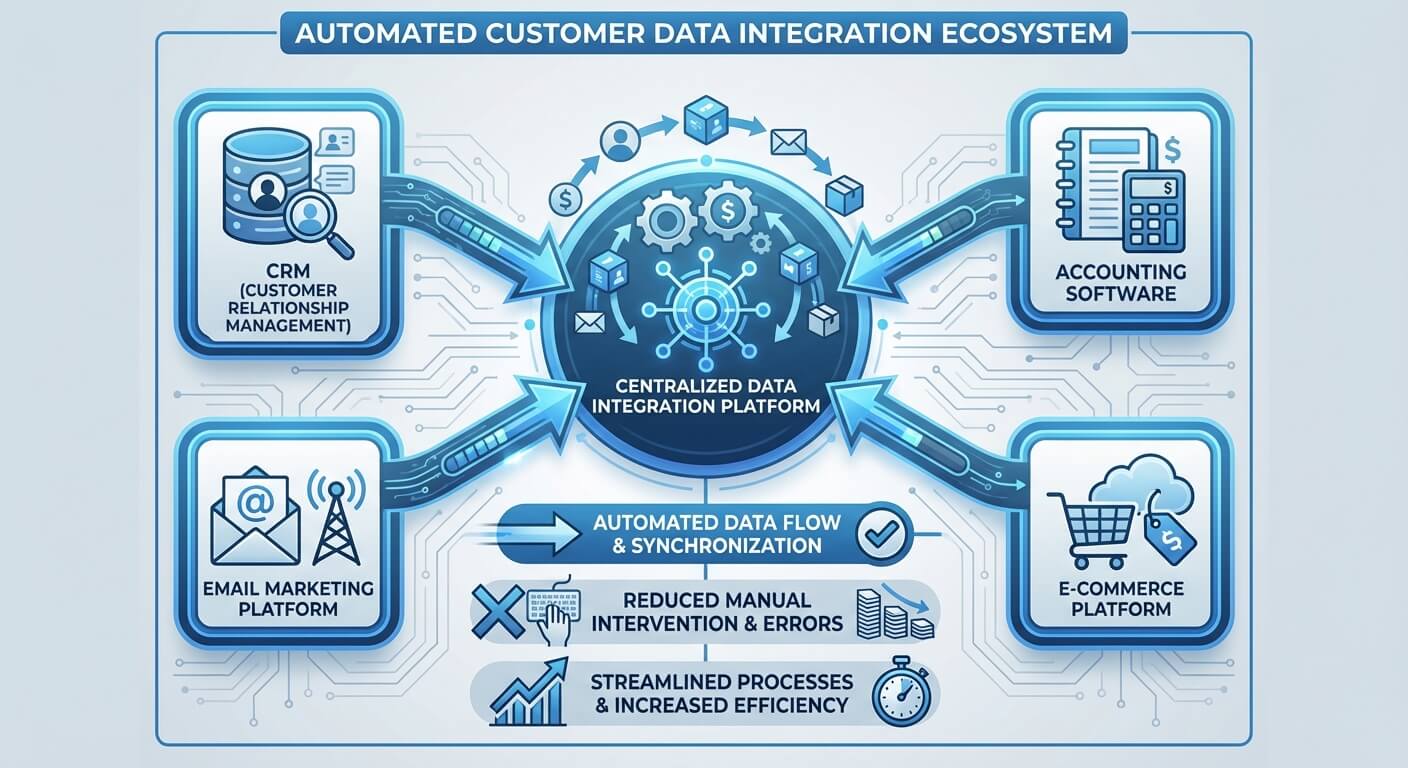
Automated invoice generation eliminates the most tedious work. Modern systems connect to your job management, project tracking, or CRM systems and create invoices automatically when work is completed or milestones are reached. No more manual data entry, no more forgotten invoices.
The best systems learn your patterns. If you typically invoice monthly retainer clients on the first of each month, automation handles this without your involvement. For project-based work, invoices can be triggered by project completion, time tracking milestones, or custom rules you define.
Smart payment reminders handle collections professionally. Automated reminder sequences start with gentle nudges and escalate gradually. The system sends initial reminders a few days before due dates, followed by polite overdue notices, and eventually more formal collection communications.
This isn’t just email templates. Good automation personalises messages, references specific invoice details, and maintains your brand voice. The system tracks all communications, so you always know what’s been sent and when.
Integrated payment processing accelerates collections. When invoices include direct payment links, customers can pay immediately without searching for cheque books or calling for payment details. Systems can accept multiple payment methods automatically, from bank transfers to card payments.
The convenience factor matters enormously. Customers who receive invoices with embedded payment options pay faster than those who must navigate separate payment processes. Reducing friction reduces payment delays.
Automated reconciliation connects the dots. When payments arrive, smart systems match them to outstanding invoices automatically. They handle partial payments, payment fees, and currency conversions without manual intervention. Bank feeds connect directly to invoicing systems, eliminating manual data entry.
Reporting automation provides instant visibility. Instead of spending hours preparing cash flow reports or VAT returns, automated systems generate accurate reports on demand. You can see outstanding payments, cash flow projections, and tax obligations in real time.
The key is choosing solutions that integrate smoothly with existing systems. The best automation feels invisible; work gets done without you thinking about it.
What each of these costs as a fixed project depends on scope, not on how many features it has:
| Scope | Example from above | Fixed project cost |
|---|---|---|
| Single workflow joining two systems | Automated invoice generation from your job management tool | From US$450 |
| Multi-step workflow with integrations | Payment reminders plus integrated payment processing | From US$1,400 |
| Document or invoice processing pipeline | Full generation, reconciliation, and reporting pipeline | From US$2,375 |
| Custom application built around a process | Client portal with predictive cash flow analytics | From US$7,250 |
Practical Implementation Steps
Successful invoicing automation starts with understanding your current process thoroughly before implementing solutions.
Map your existing workflow first. Document each step from job completion to payment receipt. Identify where delays occur, where errors happen, and which steps consume the most time. This baseline helps you measure improvement and ensures automation addresses real problems rather than imagined ones.
Track timing for each step over a few weeks. How long does invoice creation take? How often do payment reminders go out? How much time does reconciliation require? Concrete data helps justify automation investments and sets realistic expectations.
Start with your biggest bottleneck. If invoice creation takes hours weekly, prioritise automated generation. If payment tracking causes most stress, focus on reminder systems first. Solving the most painful problem first builds momentum and demonstrates value quickly.
Choose systems that grow with you. Simple solutions work better than complex ones initially, but ensure your chosen system can handle increased volume and complexity as your business grows. Migrating between systems later costs time and creates temporary disruption.
Look for solutions that connect to tools you already use. If your business runs on specific accounting software, CRM systems, or project management tools, prioritise automation that integrates directly rather than requiring separate data entry.
Test with a subset of customers initially. Roll out automation gradually rather than switching everything simultaneously. Start with your most reliable customers who are likely to adapt easily to new processes. Learn from their feedback before expanding to more complex client relationships.
Train your team on new processes. Even automated systems require human oversight. Ensure everyone understands how the automation works, when manual intervention might be needed, and how to troubleshoot common issues.
Document the new processes clearly. When automation handles routine tasks, it’s easy to forget manual override procedures. Clear documentation prevents panic when exceptions occur.
Integration Challenges and Solutions
Most invoicing automation challenges stem from poor integration planning rather than technology limitations.
Data synchronisation requires careful attention. When customer information exists in multiple systems, keeping everything aligned becomes critical. Automation amplifies inconsistencies, so clean data preparation before implementation saves significant trouble later.
Start with customer master data. Ensure names, addresses, and contact information match across all systems. Inconsistent data formats prevent smooth automation and create customer service issues when automated communications reach wrong recipients.
Payment method complexity needs thoughtful handling. Different customers prefer different payment methods, and automation systems must accommodate this variety smoothly. Some clients need purchase order references, others require specific invoice formats, and international customers might need multi-currency support.
The solution involves flexible templates and customer-specific rules. Good automation systems allow customisation per customer while maintaining overall process consistency.
Legacy system integration challenges are common but solvable. Many small businesses use older accounting software or industry-specific tools that weren’t designed for modern automation. Bridge solutions and API connections can link older systems to new automation tools without complete replacements.
Sometimes manual bridges work better than forced automation. For example, a weekly export from your project management system might feed monthly automation cycles more reliably than attempting real-time integration with an older system.
Compliance requirements vary by industry. Some sectors require specific invoice formats, approval workflows, or audit trails. Automation systems must accommodate these requirements without creating new compliance burdens.
Research compliance requirements thoroughly before choosing automation tools. It’s easier to select compliant systems initially than to retrofit compliance features later.
Working with specialists in strategic consulting can help navigate complex integration challenges efficiently. Expert guidance prevents expensive mistakes and accelerates implementation timelines.
Measuring Success and ROI
Effective automation measurement goes beyond simple time savings calculations.
Track multiple metrics to understand full impact. Time savings matter, but also measure payment speed, error rates, customer satisfaction, and cash flow improvements. Automation often delivers benefits across multiple dimensions simultaneously.
Before implementation, establish baseline measurements. How long do payments typically take to arrive? What percentage of invoices require manual corrections? How much time does monthly reconciliation consume? Concrete before-and-after comparisons demonstrate real value.
Payment speed improvements often exceed expectations. When customers receive professional invoices immediately after work completion, with convenient payment options embedded, they tend to pay faster than with manual processes. This cash flow improvement can be worth more than the time savings.
Measure average payment times monthly.
Error reduction delivers compound benefits. Fewer invoice errors mean less customer service time, fewer awkward conversations, and improved professional reputation. Track error rates and correction time to quantify this benefit.
Customer feedback provides qualitative validation. Ask customers about their experience with your new invoicing processes. Professional, timely invoices reflect well on your business and can influence customer retention and referrals.
Calculate ROI conservatively. Include implementation time, training costs, and subscription fees in your calculations. Even conservative ROI calculations typically show positive returns within 3-6 months for most small businesses.
If automation saves 15 hours monthly at $50 per hour, that’s $750 monthly benefit, or $9,000 annually. Most automation solutions cost significantly less than this, creating substantial net positive returns.
The psychological benefits are harder to quantify but equally valuable. Reduced stress, improved cash flow predictability, and freedom to focus on growth activities contribute to business success in ways that don’t appear on spreadsheets.
Beyond Basic Automation
Once basic invoicing automation works smoothly, additional optimisations become possible.
Predictive analytics help with cash flow planning. Advanced systems analyse payment patterns to predict cash flow timing more accurately. Understanding which customers typically pay early, on time, or late helps with resource planning and early intervention strategies.
Dynamic payment terms can improve overall collections. Some automation systems can offer early payment discounts automatically or adjust payment terms based on customer payment history. Good payers get more favourable terms; slower payers get shorter payment windows.
Automated dispute resolution handles common issues. When customers question invoice details, automated systems can provide instant access to supporting documentation, time logs, or project details. This reduces back-and-forth communications and resolves disputes faster.
Client portal integration improves transparency. Customers can access their invoice history, payment status, and supporting documents through automated portals. This reduces enquiry calls and improves customer satisfaction through self-service options.
Multi-business automation serves growing companies. As businesses expand into multiple entities or service lines, automation can handle complex inter-company invoicing and consolidated reporting automatically.
These advanced features typically make sense after basic automation proves successful. Implementing too much complexity initially can overwhelm teams and delay realising basic benefits.
Specialist support for process optimisation helps identify which advanced features deliver meaningful benefits versus unnecessary complexity for your specific situation.
Making the Transition
The biggest mistake businesses make is attempting perfect automation immediately rather than iterative improvement.
Start simple and build gradually. Basic automated invoice generation delivers immediate value and builds team confidence with automation tools. Once this works smoothly, add payment reminders, then reconciliation features, then advanced analytics.
Maintain manual backup procedures initially. Until automation proves completely reliable, keep manual processes available as fallbacks. This reduces implementation anxiety and provides safety nets during the transition period.
Communicate changes to customers proactively. Let customers know about new invoicing processes before implementing them. Frame changes as improvements to their experience rather than internal efficiency measures.
Most customers appreciate faster, more professional invoicing processes, but advance warning prevents confusion when processes change.
Plan for edge cases. Every business has unusual customers, complex projects, or special circumstances that don’t fit standard automation rules. Design exception handling procedures before you need them.
Edge cases often reveal automation limitations, but good planning prevents these from disrupting overall efficiency gains.
Invest in team training thoroughly. Even automated systems require human oversight and exception handling. Ensure team members understand how automation works, when to intervene manually, and how to troubleshoot common problems.
Well-trained teams maximise automation benefits and prevent small issues from becoming major disruptions.
Professional implementation support through AI automation specialists can accelerate transition timelines and prevent common implementation mistakes that delay benefits realisation.
Invoicing automation isn’t about replacing human judgement with rigid systems. It’s about eliminating routine work so people can focus on relationships, growth, and the work they actually enjoy. When automation handles the predictable tasks reliably, business owners get their time back for the activities that truly matter.
The technology exists today to eliminate most invoicing bottlenecks. The question isn’t whether automation can help your business, but how quickly you can implement solutions that free up your time for more valuable work. Every month spent on manual invoicing processes is a month that could have been invested in growth, customers, or innovation.
Frequently Asked Questions
How much does invoicing automation typically cost for a small business?
Invoicing automation costs vary considerably depending on business size and complexity, but most small businesses can implement effective solutions for $25-100 per month. Entry-level systems offering basic automated invoice generation and payment reminders start around $25-30 monthly, whilst comprehensive platforms with advanced features like multi-currency support, client portals, and predictive analytics range from $60-100 monthly. Given that the average small business spends 15-20 hours monthly on invoicing admin worth $750-800 in time value, even premium automation solutions typically deliver positive ROI within 3-6 months. Many providers offer tiered pricing based on invoice volume, allowing businesses to start small and scale as they grow.
Will my customers react negatively to automated invoicing?
Most customers actually prefer automated invoicing when implemented thoughtfully. Professional, timely invoices that arrive immediately after work completion demonstrate organisational competence and make customers’ accounting processes easier. The key is communication and convenience, inform customers about process changes beforehand, maintain your brand voice in automated communications, and provide convenient payment options like embedded payment links. Problems typically arise only when automation feels impersonal or inflexible, which is why maintaining options for human intervention on complex situations remains important.
Can invoicing automation integrate with my existing accounting software?
Modern invoicing automation solutions offer extensive integration capabilities with popular accounting platforms including Xero, QuickBooks, Sage, and FreeAgent. Most established automation tools provide native integrations or API connections that synchronise data bidirectionally, invoices created in the automation system automatically appear in your accounting software, and payments recorded in either system update both. For businesses using older or industry-specific accounting software, integration may require bridge solutions like middleware platforms or scheduled data exports rather than real-time synchronisation. Before selecting an automation solution, verify compatibility with your existing systems and understand whether integration is native, requires third-party connectors, or involves manual data bridges.
What happens when automation encounters unusual invoicing situations?
Well-designed automation systems include exception handling procedures for situations outside standard parameters. Most platforms allow you to set rules defining when human review is required, for example, invoices above certain amounts, customers with special terms, or transactions requiring additional approvals. The system flags these exceptions and routes them for manual handling whilst continuing to process standard transactions automatically. Good practice involves designing your automation with clear escalation paths and maintaining documented procedures for common exceptions. Initially, businesses typically configure automation conservatively, gradually expanding automated handling as confidence grows. The goal isn’t eliminating all manual work but ensuring routine transactions happen automatically whilst unusual situations receive appropriate human attention.
How long does it take to implement invoicing automation successfully?
Implementation timelines vary based on business complexity and chosen approach, but most small businesses can achieve basic automation within 2-4 weeks and full implementation within 2-3 months. Initial setup, including system configuration, data migration, and template customisation, typically requires 1-2 weeks. Testing with a subset of customers adds another 1-2 weeks, allowing you to refine processes based on real-world feedback before full rollout. Gradual expansion to all customers and implementation of advanced features like automated reconciliation and reporting extends the timeline to 2-3 months total. Businesses working with implementation specialists often accelerate this timeline whilst avoiding common mistakes that delay benefits realisation. The key is starting with core functionality that delivers immediate value rather than attempting comprehensive automation simultaneously, then building additional capabilities as the team gains confidence and identifies priority improvements.
How much time do small businesses typically spend on manual invoicing?
The article highlights that small businesses typically dedicate 15-20 hours monthly to accounts receivable processes. This equates to nearly three full working days, representing a substantial operational cost. Automating these tasks frees up valuable time, allowing entrepreneurs to focus on customer engagement and business expansion rather than administrative burdens.
Why are late payments a significant issue for small businesses?
Late payments severely impact cash flow, with 60% of invoices paid behind schedule. Each overdue invoice typically requires 3-4 additional follow-up communications, creating extra administrative overhead and diverting focus from core business activities. This can cause considerable stress and hinder growth and financial stability.
What is the ‘opportunity cost’ associated with manual invoicing?
The opportunity cost refers to the lost potential from time spent on invoicing administration instead of value-generating activities. Every hour dedicated to creating, chasing, and reconciling invoices is an hour not spent with customers, developing products, or building crucial business relationships. This directly impedes growth and innovation for small businesses.