Finance on Autopilot: Real-Time Cash Flow Visibility for Growing Firms
Discover how automated cash flow systems give growing businesses real-time financial visibility, reducing manual work by 80% while improving accuracy and decision-making speed.

Contents
Real-time cash flow visibility starts with connecting your financial systems so data flows automatically between them. Instead of manually entering transactions in multiple places, you create connections that update everything simultaneously.
Checking bank balances once a week and updating a spreadsheet when you remember is not cash flow visibility, it’s an educated guess dressed up as a system. Real-time visibility means knowing your position without doing that manual work.
This approach works until it doesn’t. Growth brings complexity. More customers mean more invoices. More suppliers mean more payment schedules. More staff mean more regular outgoings. What started as a simple operation you could track mentally becomes a juggling act that keeps you awake at night.
The solution isn’t working harder or checking spreadsheets more often. It’s building systems that give you real-time visibility into your cash position without the manual effort. When your financial data updates automatically and alerts you to potential issues before they become problems, you can focus on running your business instead of constantly monitoring it.
The Hidden Cost of Manual Cash Flow Management
Time and again, I watch small business owners lose hours trying to maintain financial visibility. They’re not lazy or disorganised, they’re drowning in manual processes that don’t scale with their success.
A typical growing business might have cash flowing through multiple channels. Customer payments arrive via bank transfer, PayPal, and card payments. Suppliers get paid by direct debit, cheque, and online banking. Subscription services renew automatically while ad-hoc expenses hit company cards.
Each transaction needs recording, categorising, and reconciling. Invoices need tracking from creation to payment. Purchase orders need matching against deliveries and bills. Cash flow forecasts need updating with actual figures.
Financial administration absorbs a significant part of every week in most small businesses, and almost all of it is work a machine could do. Track your own hours across one month and price them at your hourly rate. That number is usually larger than owners expect, and it is the only one that should drive your decision.
The real cost isn’t just the time, though. It’s the decisions you can’t make because you don’t have current information. When you’re working from week-old data, you might miss early payment discounts, fail to chase overdue invoices promptly, or make purchasing decisions based on an inaccurate cash position.
Building Automated Financial Visibility
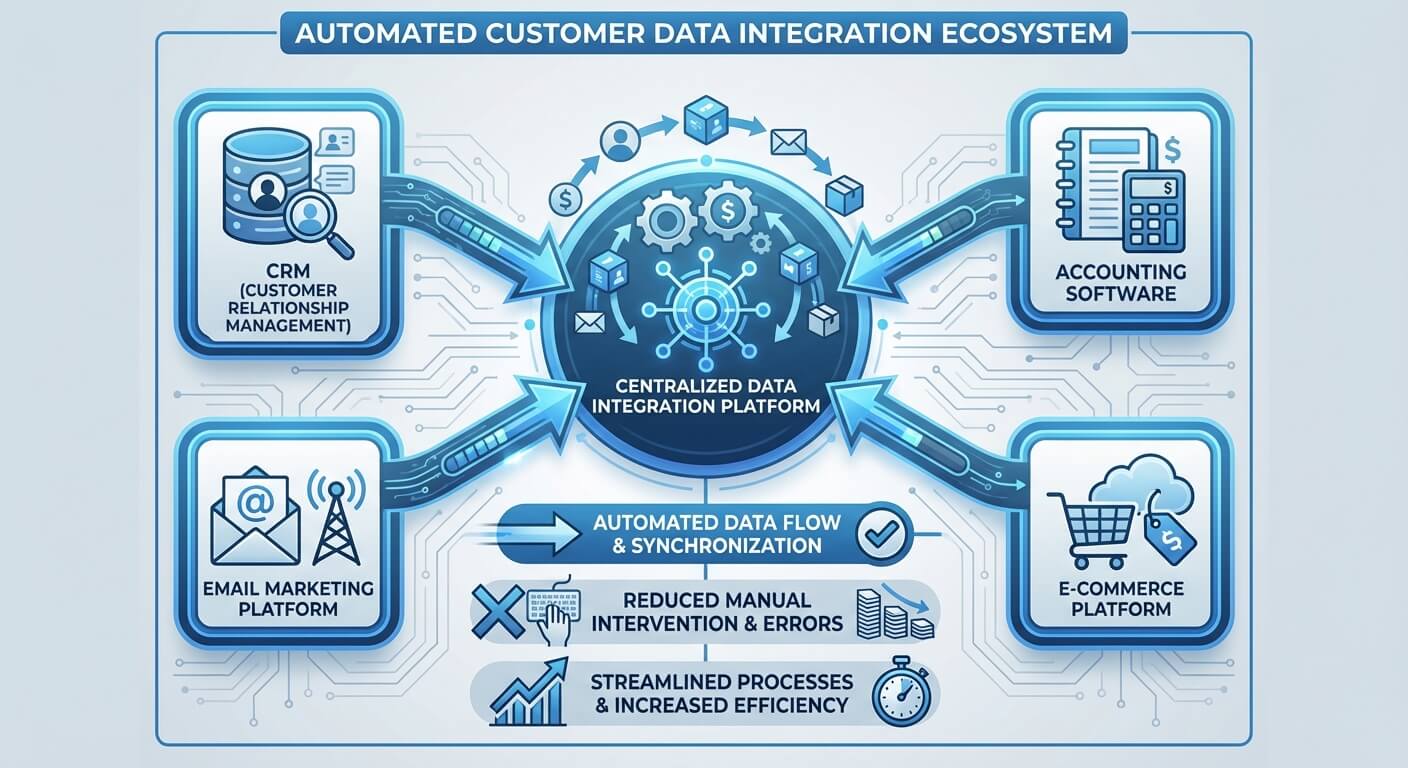
Your accounting software becomes the central hub, but it needs live data from all your transaction sources. Bank feeds eliminate manual entry for most transactions. Payment processor integrations capture online sales automatically. Expense management tools photograph receipts and categorise spending without spreadsheet updates.
The key is designing these connections to match your business processes, not forcing your processes to match software limitations. If you invoice customers then track payments, your system should automatically match payments to invoices and update customer records. If you operate on purchase orders, your system should track the entire cycle from order through delivery to payment.
Businesses implementing integrated financial systems have reduced manual data entry and improved accuracy. More importantly, they gained daily instead of weekly visibility into their cash position.
This visibility enables proactive management instead of reactive crisis handling. When you can see which invoices are approaching their due dates, you can chase them before they become overdue. When you can forecast cash requirements for the next month, you can arrange facilities before you need them.
Essential Components of Automated Cash Flow Systems
Effective automated systems comprise several interconnected elements, each handling specific aspects of your financial operation. The sophistication you need depends on your business complexity, but certain components benefit almost every growing company.
Bank feed automation captures transactions as they happen. Instead of downloading statements and entering figures manually, your accounting software receives transaction data directly from your bank. Modern systems can categorise common transactions automatically and flag unusual items for review.
Invoicing automation generates and sends invoices based on your business rules. For service businesses, this might mean creating monthly recurring invoices automatically. For product businesses, it might mean generating invoices when orders ship. The system tracks invoice status and sends automated reminders for overdue payments.
Expense management automation captures costs as they occur. Employees photograph receipts, which get processed automatically for category, amount, and VAT. Company card transactions import directly with merchant information. Subscription services and direct debits get recorded automatically.
Reconciliation automation matches transactions between systems. When a customer pays an invoice, the system automatically marks it as paid in both the accounting software and CRM. When a supplier bill gets paid, it updates both the accounts payable and bank records simultaneously.
Reporting automation generates regular financial summaries without manual compilation. You might receive daily cash position updates, weekly aged debtor reports, or monthly profit and loss statements automatically.
Implementing Real-Time Visibility Without Disruption

Rolling out automated financial systems requires careful planning to avoid disrupting your existing operations. The goal is improving visibility and reducing manual work, not creating chaos during implementation.
Start by mapping your current financial processes. Document how money flows into and out of your business, where information gets recorded, and who handles each step. This mapping reveals which processes would benefit most from automation and where integration points need establishing.
Choose systems that integrate well with your existing setup rather than forcing wholesale changes. If your team knows your current accounting software, look for automation tools that enhance it rather than replacing it entirely. If you already use specific payment processors or banking relationships, prioritise systems that connect easily with these services.
Implement changes gradually, testing each component thoroughly before moving to the next. You might start with bank feed automation, then add invoicing automation once the first component works smoothly. This staged approach lets you verify each system component works correctly while maintaining business continuity.
Train your team on new processes before switching over completely. Even automated systems need human oversight for exceptions and decision-making. Your staff should understand what the system does automatically and when they need to intervene manually.
Advanced Features for Growing Businesses
As your business grows, basic automation might not provide sufficient sophistication for your needs. Advanced features can deliver deeper insights and handle more complex financial scenarios.
Predictive cash flow modelling uses historical data and current trends to forecast future cash positions. Instead of simple projections based on known invoices and bills, these systems analyse patterns to predict likely outcomes. They might factor in seasonal variations, customer payment behaviour, or supplier term changes to provide more accurate forecasts.
Multi-currency handling becomes essential for businesses dealing with international customers or suppliers. Advanced systems track exchange rate fluctuations, calculate gains or losses automatically, and provide cash flow visibility in multiple currencies simultaneously.
Project-based financial tracking suits businesses that work on specific client engagements or product developments. These systems track costs and revenues by project, providing profitability analysis and cash flow impact for individual engagements.
Advanced approval workflows handle complex authorisation requirements. Instead of routing all purchases through the business owner, systems can implement spending limits, department budgets, and multi-level approvals automatically.
Integration with broader business systems provides comprehensive operational visibility. When your financial systems connect with inventory management, CRM, and project management tools, you gain insights into how operational decisions affect cash flow.
Choosing the Right Technology Stack
Selecting appropriate technology for automated financial visibility requires balancing functionality, cost, and implementation complexity. The right choice depends on your specific requirements, technical capabilities, and growth trajectory.
Cloud-based systems generally offer the best balance of functionality and accessibility for small businesses. They provide automatic updates, reliable backups, and access from multiple locations without requiring internal IT support. Integration capabilities tend to be better with cloud systems since vendors focus on connecting with other popular business tools.
API-based integrations offer the most flexibility for connecting different systems. When your accounting software, payment processors, banking, and other tools provide APIs, you can create custom connections that match your specific processes. This approach requires more technical expertise but delivers the most tailored solution.
Pre-built integrations provide quicker implementation with less technical complexity. Many software vendors offer direct connections to popular complementary tools. While these might not provide perfect functionality matches, they often deliver sufficient capability with much faster deployment.
Consider data security and compliance requirements when selecting systems. Financial data needs protection both in transit and storage. Look for systems that provide appropriate encryption, access controls, and audit trails for your industry and size.
Measuring Success and Continuous Improvement

Implementing automated financial visibility is not a one-time project but an ongoing process of improvement and optimisation. Measuring the impact helps justify the investment and identifies areas for enhancement.
Time savings provide the most obvious metric. Track how much time you and your team spend on financial administration before and after automation. Include both direct tasks like data entry and indirect activities like searching for information or correcting errors.
Accuracy improvements often deliver significant value. Count the number of errors, reconciliation discrepancies, or late payments before and after implementation. Fewer errors save time and prevent costly mistakes.
Decision-making speed reflects improved information availability. Measure how quickly you can answer questions about cash position, customer payments, or expense analysis. Faster access to accurate information enables better business decisions.
Cash flow management effectiveness might show in reduced bank charges, better payment terms negotiations, or improved working capital utilisation. When you can see cash requirements in advance, you can manage them more effectively.
Building Team Capabilities and Processes
Automated systems require human oversight and decision-making to function effectively. Building team capabilities ensures you maximise the benefits of your technology investment.
Train team members to interpret automated reports and identify issues requiring attention. While systems can flag anomalies, human judgement determines appropriate responses. Your team should understand what constitutes normal versus concerning patterns in your automated reports.
Establish clear processes for handling exceptions and system failures. Automated systems occasionally need manual intervention for unusual transactions or integration problems. Having documented procedures prevents confusion when these situations arise.
Develop monitoring routines to ensure systems continue operating correctly. Regular checks of key integrations, data accuracy, and report generation help identify problems before they become significant issues.
Create backup procedures for critical financial processes. While automated systems improve reliability, having manual alternatives ensures business continuity if technology problems occur.
Common Implementation Challenges and Solutions
Deploying automated financial systems presents predictable challenges that proper planning can minimise or avoid entirely.
Data quality issues often emerge when connecting systems. Inconsistent customer names, product codes, or account references between systems can prevent proper matching and reconciliation. Clean up core data before implementing automation to avoid ongoing problems.
Integration complexity increases with the number of systems involved. Start with the most impactful connections and add complexity gradually. A few well-functioning integrations deliver more value than many partially-working connections.
Change resistance from team members familiar with existing processes needs addressing through training and involvement. Include staff in system selection and process design so they understand benefits and feel ownership of improvements.
Over-automation can create rigidity that hinders necessary flexibility. Maintain manual override capabilities for exceptional circumstances while automating routine processes.
The Path Forward
Real-time cash flow visibility transforms financial management from a reactive scramble into proactive business control. When your systems provide current information automatically, you spend less time gathering data and more time acting on insights.
The investment required depends on your current systems and desired sophistication, but even basic automation delivers substantial improvements over manual processes. Most businesses I have worked with reach positive ROI on integrated financial systems inside a year, though that depends entirely on how much manual reconciliation they are doing at the start.
Start by identifying your most time-consuming financial administration tasks and exploring automation options for these areas. Whether that’s integrating your existing systems to eliminate duplicate data entry, implementing comprehensive process automation to streamline workflows, or developing custom solutions for unique requirements, the key is beginning with clear objectives and building systematically.
Success comes from matching technology capabilities to business needs, not from implementing the most sophisticated system available. Focus on solving real problems in your current processes rather than adding features you might never use.
Your financial systems should serve your business growth, not constrain it. When cash flow visibility happens automatically in real-time, you gain the foundation for confident decision-making and sustainable scaling. The time you save on financial administration returns to activities that actually generate revenue and build your business.
Frequently Asked Questions
How long does it take to implement automated cash flow systems?
Implementation timescales vary based on business complexity and existing systems. Basic bank feed automation and invoicing can be operational within 2-4 weeks. Comprehensive integrations connecting multiple systems typically require 8-12 weeks for proper setup, testing, and team training. The key is implementing changes gradually rather than attempting everything simultaneously, which allows you to maintain business continuity whilst building confidence in each component before adding the next.
What’s the minimum business size that justifies cash flow automation?
Automation becomes valuable when you’re spending more than 5-10 hours weekly on financial administration or when delays in financial visibility affect decision-making. This typically occurs around $312,000-$625,000 in annual turnover, though service businesses with high transaction volumes might benefit earlier. The decision depends less on absolute size and more on whether manual processes create bottlenecks, errors, or prevent you from focusing on growth activities.
Can automated systems handle industry-specific requirements?
Modern financial automation platforms offer extensive customisation for industry-specific needs. Construction firms can track project-based costs and retention payments. Retailers can integrate inventory valuation with cash flow. Professional services can link time tracking to invoicing and cash forecasting. The key is selecting systems with appropriate sector expertise or APIs that allow custom development for unique requirements. Most industries have established automation patterns that vendors understand well.
What happens if the automated systems fail or produce errors?
Robust automation includes monitoring, error detection, and backup procedures. Systems should alert you to integration failures, unusual transactions, or reconciliation discrepancies immediately. Maintain manual override capabilities and documented procedures for critical processes. Cloud-based systems typically offer 99.9% uptime, and proper implementation includes regular data backups and audit trails. The risk of system failure is generally lower than the risk of human error in manual processes, provided you implement appropriate safeguards.
How do I ensure data security with connected financial systems?
Financial data security requires encryption in transit and at rest, access controls, and regular security audits. Choose systems with ISO 27001 certification, SOC 2 compliance, or equivalent security standards. Implement multi-factor authentication for all user access. Limit system connections to necessary integrations only. Review access permissions quarterly and maintain audit logs of all financial data changes. Reputable cloud-based financial platforms typically offer better security than small businesses can achieve with on-premise systems, as they invest heavily in security infrastructure and expertise.