AI Agents and Zapier for Retail Inventory Management: Complete Guide
Learn how AI agents and Zapier reduce stockouts by 20-30% and save 15 hours weekly on inventory tasks. Complete setup guide for retail businesses.
Contents
Retail businesses that connect AI agents with Zapier for inventory management typically reduce stockouts by 20-30% and cut manual tracking time by 15 hours weekly. AI inventory automation for a small retailer runs $70 to $220 a month, combining Zapier from $19.99 with AI inventory tools at $50 to $200.
AI-driven inventory systems can help reduce overall inventory costs. The combination works because AI handles complex demand patterns. Zapier connects your existing tools without expensive custom development.
Why Traditional Inventory Systems Fail Modern Retailers
Inventory visibility is a common operational challenge reported by retail executives. This gap between demand and supply chain visibility costs retailers billions annually.
Spreadsheets and basic inventory software weren’t built for today’s retail reality. You’re selling across multiple channels. Demand shifts weekly, sometimes daily. Your team spends hours reconciling stock counts that never quite match.
Manual inventory tracking creates three expensive problems. First, you overstock slow movers that tie up cash. Second, you understock bestsellers and lose sales. Third, your staff burns time on data entry instead of serving customers.
The real issue isn’t lazy employees or bad software. It’s the gap between when things happen and when your systems know about it. A sale on your Shopify store doesn’t instantly update your warehouse count. A supplier delay doesn’t automatically adjust your reorder triggers.
This is where AI agents change the game.
What AI Agents Actually Do for Inventory Management
AI-powered inventory management can improve forecast accuracy compared with traditional methods. This accuracy translates directly into fewer stockouts and less dead stock.
An AI agent is software that monitors conditions, makes decisions, and takes actions without constant human input. For inventory, that means watching sales velocity, supplier lead times, seasonal patterns, and dozens of other variables simultaneously.
AI inventory agents operate fundamentally differently from rule-based systems. Traditional automation follows rigid if-then logic: “If stock falls below 50, order 100 more.” AI agents learn from patterns and adapt. They notice that your blue widgets sell 40% faster in March. They spot that Supplier A’s lead times stretch during holiday seasons. They adjust recommendations automatically.
The practical difference matters most for SMBs. You don’t need a data science team to benefit. Modern AI agents come pre-trained on retail patterns. They learn your specific business within weeks of connecting to your data.
How Zapier Connects Everything Without Custom Code
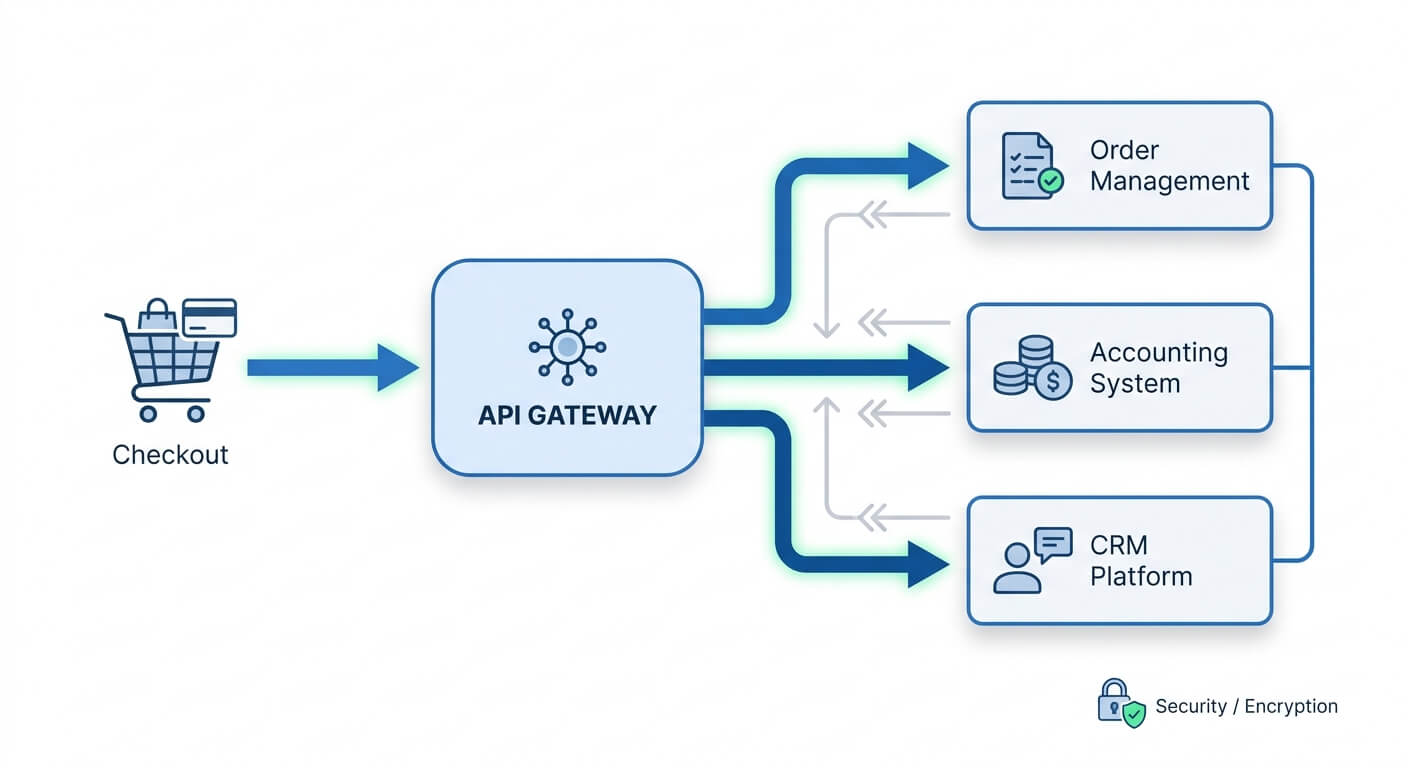
Zapier acts as the nervous system that lets AI agents communicate with your existing tools. It connects over 6,000 apps. This includes Shopify, WooCommerce, QuickBooks, Xero, and most inventory management platforms.
Here’s a practical example. Your AI agent determines you need to reorder Product X. Without Zapier, that insight sits in a dashboard waiting for someone to notice. With Zapier, the agent’s recommendation automatically creates a purchase order in your accounting software. It emails your supplier and updates your inventory forecast.
The connection eliminates the most dangerous gap in inventory management. That’s the delay between knowing and doing.
Zapier workflows (called Zaps) handle the boring logistics. When stock hits a threshold, trigger an action. When a supplier confirms shipment, update your expected inventory. When sales spike unexpectedly, alert your purchasing team. These connections run 24/7 without anyone remembering to check.
For businesses already using n8n for workflow automation, you can achieve similar results. The principle remains the same: connect your AI’s insights to real actions across your tools.
Building Your First AI Inventory Automation
Start small. The businesses I’ve worked with see the best results when they automate one painful process first. Then expand.
Step 1: Identify Your Biggest Inventory Pain Point
Be specific. “Better inventory management” isn’t actionable. “We run out of our top 20 products twice monthly” gives you a clear target.
Common starting points include:
- Reorder alerts that actually account for lead times
- Automatic stock level syncing across sales channels
- Low stock notifications that reach the right person immediately
- Purchase order creation when inventory hits thresholds
Step 2: Choose Your AI Component
Several AI tools work well with Zapier for inventory intelligence:
Inventory Planner connects directly to Shopify and integrates with Zapier. It uses machine learning to forecast demand and suggest reorder quantities.
Katana offers AI-powered inventory management for manufacturers and retailers. It includes Zapier integration for workflow automation.
Custom GPT agents can analyse your sales data and generate recommendations. Zapier then routes these to your other systems.
The right choice depends on your existing tools. If you’re already deep in the Shopify ecosystem, start there. If you use a separate ERP, find an AI tool that connects to it.
Step 3: Build the Zapier Connection
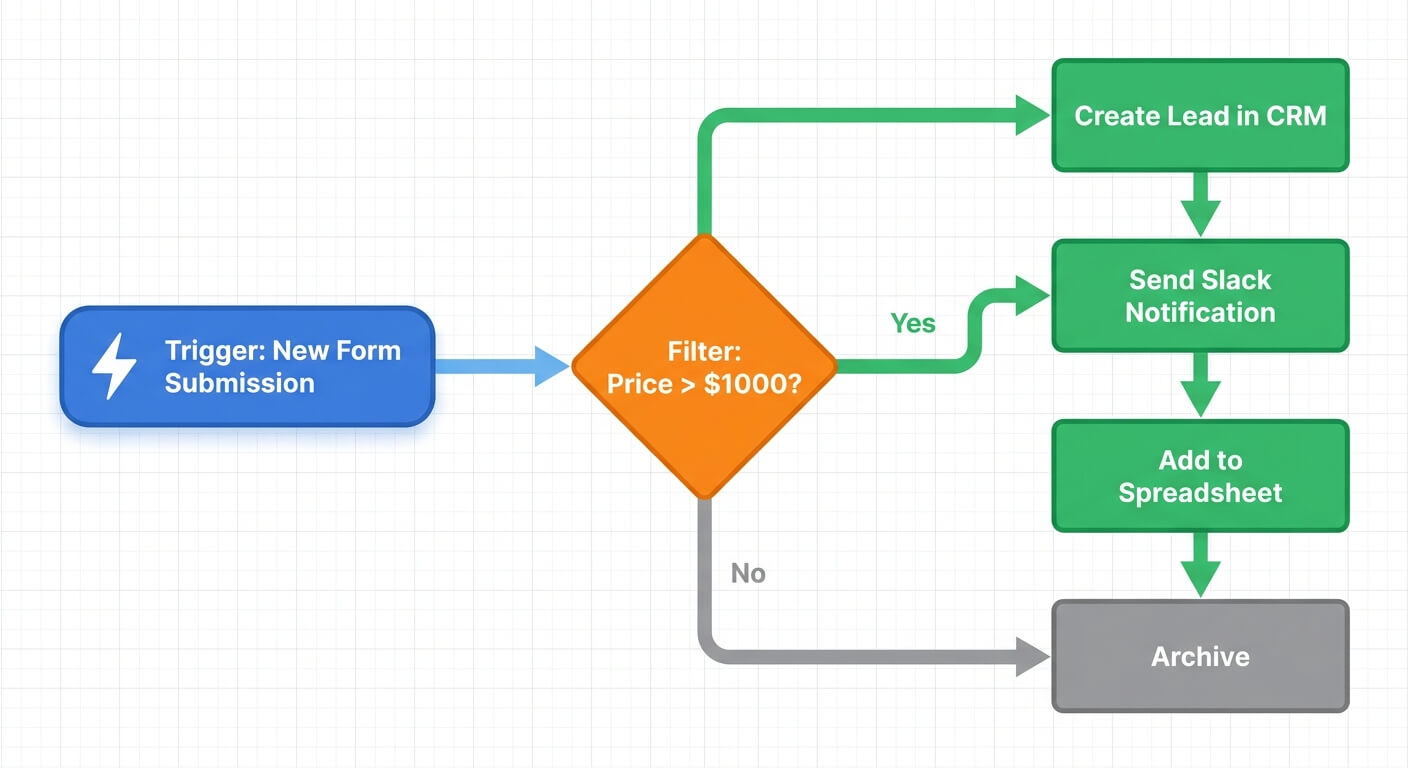
A basic reorder automation Zap looks like this:
- Trigger: AI agent identifies product below reorder threshold
- Action 1: Create purchase order in accounting software
- Action 2: Send order to supplier via email
- Action 3: Update inventory spreadsheet or database
- Action 4: Notify purchasing manager via Slack
Zapier’s official documentation walks through connecting inventory apps step by step. Most retailers get a basic automation running in under two hours.
Step 4: Set Up Human Checkpoints
Here’s a counterintuitive insight: full automation isn’t always the goal. Many successful implementations keep humans in the loop for high-value decisions.
For routine reorders of staple products, automate completely. For expensive items or new products with unpredictable demand, have the AI generate recommendations. A human approves before orders go out.
This hybrid approach catches the AI’s occasional mistakes. It still saves most of the manual work. Over time, as you trust the system’s judgment, you can automate more decisions.
Real Workflow Examples That Work
Theory only gets you so far. Here are specific automations that businesses I’ve helped have successfully implemented.
Multi-Channel Stock Sync
Problem: Selling the same products on Shopify, Amazon, and a physical store means constant stock discrepancies.
Solution: Zapier monitors sales across all channels. When any sale occurs, it updates a central inventory database. The AI agent checks this database every hour. It looks for sync errors or concerning stock levels.
When the AI spots a channel showing higher stock than reality, it triggers a correction. No more overselling because Amazon didn’t know about your Shopify sales.
Intelligent Supplier Management
Problem: Different suppliers have different lead times. One ships in 3 days, another takes 3 weeks. Your reorder points need to account for this.
Solution: The AI agent learns each supplier’s actual delivery performance. Not just their promised lead times. It adjusts reorder triggers automatically.
When Supplier A starts delivering late, the system increases that supplier’s buffer stock automatically. Zapier sends alerts when supplier performance degrades significantly. You can address the relationship or find alternatives.
This connects directly to predictive analytics for retail inventory. Historical patterns inform future decisions.
Seasonal Demand Adjustment
Problem: You know December is busy. But manually adjusting hundreds of reorder points twice yearly is tedious and error-prone.
Solution: The AI analyses previous years’ sales patterns by product. It automatically adjusts safety stock levels as seasons approach.
For products with strong seasonal patterns, the system increases reorder points 4-6 weeks before the typical demand spike. After peak season, it reduces them to prevent overstock.
Zapier handles the communication. It alerts you to unusual patterns. It notifies suppliers of expected order increases. It updates your demand forecasts in planning tools.
Common Mistakes and How to Avoid Them
AI inventory projects often fail due to poor data quality and unrealistic expectations. Here are the most common errors that derail automation projects.
I’ve seen these errors derail otherwise solid automation projects.
Mistake 1: Automating Bad Processes
If your current inventory categorisation is a mess, AI won’t magically fix it. Clean your product data first. Ensure SKUs are consistent. Categories should make sense. Historical sales data must be accurate.
Garbage in, garbage out applies doubly to AI systems.
Mistake 2: Ignoring Supplier Relationships
Automated purchase orders still need human relationships behind them. Your suppliers should know you’re implementing automation. Some may offer better terms or faster processing for automated orders.
Mistake 3: Setting and Forgetting
AI systems need periodic review. Markets change. Suppliers change. Your product mix changes. Schedule monthly reviews of your AI’s recommendations versus actual outcomes.
Look for patterns where the AI consistently over or underpredicts. These gaps reveal opportunities to improve your system. They identify market changes the AI hasn’t learned yet.
Mistake 4: Over-Automating Too Fast
Start with low-risk automations. Reorder alerts for staple products carry minimal risk. Automatic ordering of expensive specialty items carries significant risk if something goes wrong.
Build trust in the system gradually. My guide to building an AI roadmap covers how to prioritise what to automate first.
Measuring Success and Scaling Up
Track these metrics before and after implementation:
- Stockout frequency: How often do products hit zero?
- Overstock percentage: What portion of inventory hasn’t moved in 90+ days?
- Manual time spent: Hours weekly on inventory tasks
- Forecast accuracy: Predicted demand versus actual sales
- Order lead time: Days from reorder trigger to stock available
Most businesses see meaningful improvement within 60-90 days. The AI needs time to learn your patterns. Don’t judge results in the first month.
Once your first automation runs smoothly, expand to adjacent problems. If reordering works well, add supplier performance tracking. If stock syncing is solid, add demand forecasting.
The business case for AI investments often strengthens after initial success. You have real numbers to show.
Frequently Asked Questions
How much does AI inventory automation cost for a small retailer?
Basic setups using Zapier (starting at $19.99/month) and AI inventory tools ($50-200/month) cost between $70-220 monthly. This typically pays for itself if you prevent just one or two stockouts per month. Or save 5+ hours of manual work weekly. Custom enterprise solutions cost significantly more but aren’t necessary for most SMBs.
Will AI replace my inventory manager?
Unlikely. AI handles data analysis and routine decisions. Humans still manage supplier relationships, handle exceptions, and make strategic decisions about product mix. Most businesses find AI changes the inventory role rather than eliminating it. The focus shifts from data entry to strategy and relationship management.
How long before the AI learns my business patterns?
Most AI inventory systems show improved forecasting within 4-8 weeks. This assumes you have at least 6-12 months of historical sales data. Seasonal patterns take a full year to learn properly. Products with highly irregular demand take longer. Start with your most predictable products for quickest wins.
Can I use this with my existing inventory software?
Almost certainly yes. Zapier connects to most popular inventory platforms. This includes TradeGecko, Cin7, DEAR Inventory, Fishbowl, and Ordoro. If your software has an API or appears in Zapier’s app directory, integration is possible. Check Zapier’s app directory for your specific tools before committing.