Business Process Automation ROI Calculator: Prove Your Investment Pays Off
Calculate automation ROI with a complete framework. Get boardroom-ready figures that justify your automation investment.
Contents
Most SMB owners know automation saves time. But when the finance team asks for hard numbers, vague promises won’t cut it. You need proof that automation actually pays for itself. Marathon prices automation builds as fixed projects, from US$450 for a single workflow to US$16,000 for a custom application, which gives you a real cost line to weigh against the savings below.
A business process automation ROI calculator transforms gut feelings into boardroom-ready figures. Workflow automation can generate a positive return on investment for companies over time. The key is knowing which costs to measure. It’s also about which benefits to quantify. You need to present results in a way that gets budget approval.
Why Most ROI Calculations for Automation Fail
Automation ROI is the ratio of net benefits to total investment. I express this as a percentage. Automation projects with a clear ROI framework are the ones that get funded a second time, because somebody can show what the first one returned.
Process automation projects without structured measurement face funding challenges. This creates barriers for even successful initiatives seeking expansion.
Here’s the uncomfortable truth. Most businesses calculate automation ROI wrong. They focus only on obvious savings like reduced headcount. They ignore hidden costs like training and maintenance. They forget about intangible benefits that are hard to measure but very real.
The result? Either inflated projections that disappoint stakeholders. Or underestimated returns that kill promising projects before they start.
Three common mistakes derail automation ROI calculations:
Counting only labour savings. Yes, automation reduces manual work. But it also cuts error rates. It speeds up processes. It improves customer satisfaction. A business process automation ROI calculator must capture all these benefits.
Forgetting ongoing costs. Software subscriptions add up over time. Maintenance costs continue monthly. Updates require staff time. The occasional consultant visit has costs too. Your calculation needs a full three to five year cost picture.
Using averages instead of actuals. Generic industry benchmarks are useful starting points. But your specific processes matter more. Your error rates are unique. Your labour costs differ from averages.
The Complete Formula for Calculating Automation ROI
Let’s build a proper calculation framework. The basic formula is simple:
ROI = (Net Benefits ÷ Total Costs) × 100
But the details matter most. Here’s what belongs in each category.
Total Costs (Your Investment)
Start with everything you’ll spend over your measurement period. Most businesses use three years.
| Cost category | What it covers |
|---|---|
| Software costs | Platform subscriptions for tools like n8n or Zapier, plus any connected apps |
| Implementation | Internal time spent building workflows, or agency fees if you outsource. Marathon prices this as a fixed project: from US$450 for a single workflow joining two systems, and from US$7,250 for a custom application |
| Integration | Connecting your CRM, accounting software, and other systems |
| Training | Getting your team comfortable with new processes |
| Maintenance | Ongoing tweaks, updates, and troubleshooting. |
| Opportunity cost | What else could you have done with this budget? |
For a typical SMB automating five to ten core workflows, expect first-year costs between $15,000 and $50,000. This drops significantly in years two and three. Implementation costs disappear after year one.
Net Benefits (Your Returns)
Now for the satisfying part. Benefits fall into three buckets.
Direct savings are easiest to measure:
- Hours saved per week multiplied by hourly cost
- Reduced error correction time
- Lower software costs from consolidating tools
- Decreased overtime payments
Revenue improvements take more effort to track:
- Faster quote turnaround leading to higher win rates
- Improved lead response times increasing conversions
- Better customer service driving repeat purchases
Risk reduction is often overlooked:
- Fewer compliance violations and associated fines
- Reduced data entry errors in financial records
- Lower staff turnover from eliminating tedious work
Practical Benchmarks for SMB Automation Projects
Process automation benchmarks vary significantly by industry and process type. Administrative tasks are commonly cited as an area where automation can yield time savings. Customer-facing processes average 20-35% improvement in efficiency.
This highlights the importance of systematic measurement approaches.
What returns should you actually expect? Based on projects I’ve delivered, here are realistic benchmarks for common automation targets.
Invoice processing: Most SMBs spend 15-30 minutes per invoice on data entry, approval routing, and filing. Automation cuts this to 2-5 minutes. For a business processing 200 invoices monthly, that’s 40-80 hours saved. At $25 per hour, annual savings reach $12,000-$24,000. Learn more in my guide to automating invoicing to eliminate admin bottlenecks.
Lead qualification: Manual lead scoring might take your sales team 5 hours weekly. An automated system using CRM data and behaviour triggers can handle this instantly. More importantly, response times drop from hours to minutes. That speed advantage alone can boost conversion rates by 30-50%.
Meeting administration: Between scheduling, note-taking, and follow-ups, meetings consume far more time than the meeting itself. My clients typically reclaim 5-10 hours weekly through calendar and transcription automation.
Financial reporting: Monthly close processes that take a week can shrink to two days. Real-time dashboards eliminate the scramble for numbers when leadership asks questions. See how this transforms cash flow visibility.
Building Your Own Business Process Automation ROI Calculator
Ready to run the numbers for your business? Follow this step-by-step approach.
Step 1: Document Current State
Before calculating anything, you need baseline data. Pick your target process and measure:
- How long does each instance take?
- How many instances occur per week or month?
- Who performs this work and what’s their fully loaded cost?
- What’s the current error rate?
- What happens when errors occur?
Spend two weeks tracking these metrics accurately. Estimates will sabotage your calculation.
Step 2: Project Future State
Research automation solutions. Estimate the new metrics carefully. Be conservative in your projections. If a vendor claims 80% time savings, assume 50% for your calculation. You can always revise upward later.
Also estimate:
- Implementation time and cost
- Monthly subscription fees
- Hours needed for ongoing maintenance
- Training requirements
Step 3: Calculate Annual Benefits
Use this worksheet approach:
Time savings: (Current hours minus Future hours) × Hourly cost × 52 weeks
Error reduction: Current errors per year × Cost per error × Reduction percentage
Revenue impact: Estimate conservatively based on faster response times or improved accuracy

Step 4: Calculate Total Investment
Add up all costs over your measurement period:
Year 1: Implementation plus Software plus Training
Years 2-3: Software plus Maintenance plus Occasional updates
Step 5: Run the Final Calculation
Plug your numbers into the formula:
Three-Year ROI = ((Total Benefits minus Total Costs) ÷ Total Costs) × 100
Also calculate payback period:
Payback Months = Total Investment ÷ Monthly Benefits
Most well-planned automation projects show payback within 6-12 months. If your calculation shows longer, either the process isn’t a good automation candidate. Or you’ve underestimated benefits.
Beyond the Calculator: Intangible Benefits That Matter
Numbers tell most of the story, but not all of it. Some automation benefits resist easy quantification. That doesn’t mean they’re worthless.
Employee satisfaction improves when you eliminate soul-crushing repetitive work. Good luck calculating the exact value. But lower turnover and higher engagement are real outcomes.
Scalability means handling 2x volume without 2x staff. This matters enormously for growing businesses.
Data quality improves when humans stop manually transferring information between systems. Better data enables better decisions.
Competitive advantage emerges when you respond faster. You make fewer mistakes. You serve customers better than rivals stuck in manual mode.
Include a qualitative section in your ROI presentation. Decision makers appreciate seeing the full picture. This remains true even when some benefits lack precise numbers.
Common Objections and How to Address Them
Even with solid numbers, you’ll face pushback. Prepare for these common objections.
“We tried automation before and it didn’t work.” Ask what went wrong. Usually it’s poor process selection. Sometimes it’s inadequate training. Often it’s unrealistic expectations. Show how your approach addresses those specific failures.
“The upfront cost is too high.” Shift the conversation to payback period and three-year ROI. A $30,000 investment returning $90,000 over three years is a bargain, not an expense.
“Our processes are too unique.” Modern automation platforms handle remarkable variety. Offer a small pilot project to demonstrate feasibility. This requires no major commitment. My assessment service helps identify the best starting point.
“What about job losses?” Reframe this honestly. Automation typically shifts work, not eliminates jobs. Your team handles more volume. They focus on higher-value tasks. They develop new skills. The businesses I work with usually grow headcount after successful automation. They don’t shrink it.
Getting Started: Your Next Steps
Building a business process automation ROI calculator for your specific situation takes effort. But the payoff is clarity. You’ll know exactly which processes deserve investment. You’ll know which should wait.
Start small. Pick one process that’s clearly inefficient. Make sure it’s well-documented and high-volume. Run the numbers carefully. If ROI looks promising, proceed with implementation. Use actual results to refine your calculation method. Then tackle larger projects.
Need help identifying the right processes or building your business case? My strategic consulting service has guided many SMBs through this exact journey. I can help you build the case that gets stakeholder buy-in and budget approval.
Frequently Asked Questions
What ROI percentage should I expect from business process automation?
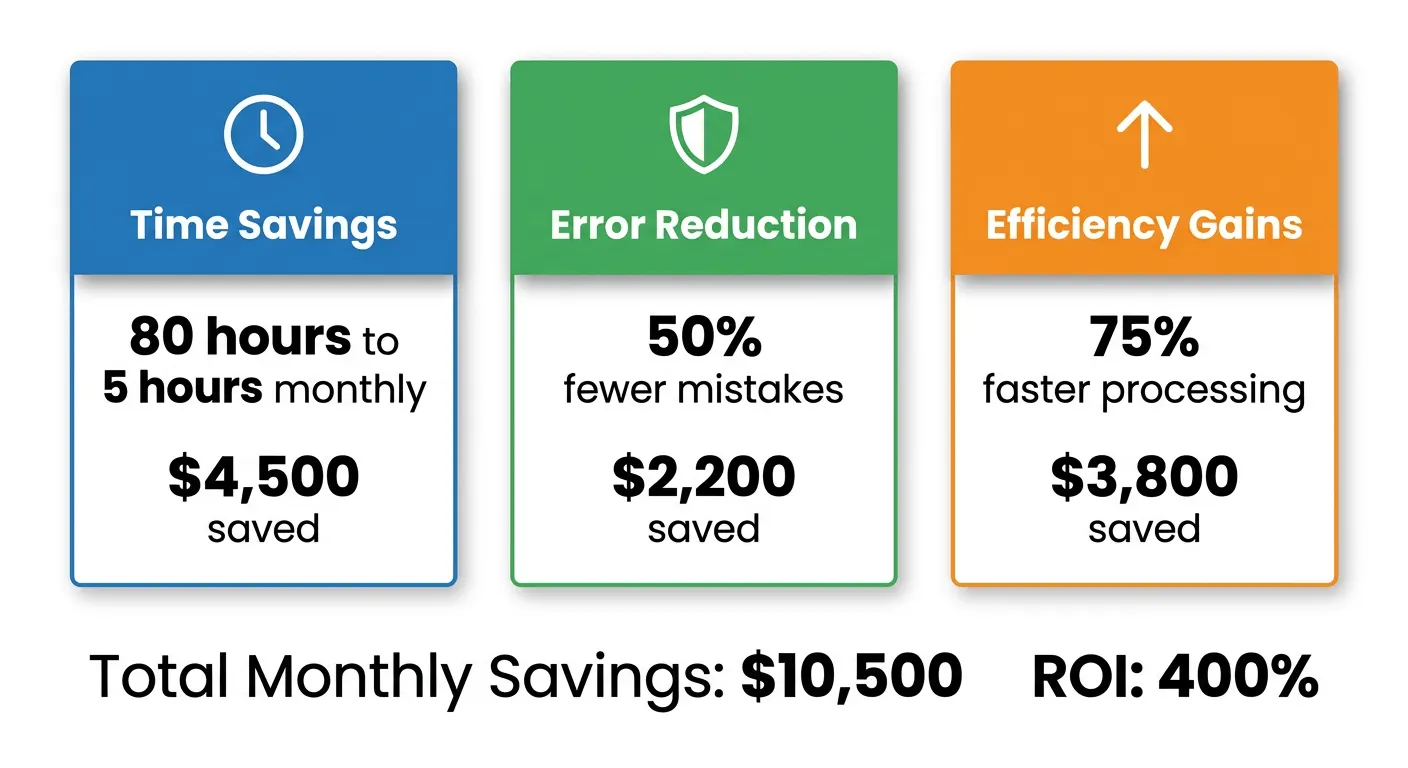
Realistic automation ROI ranges from 100% to 400% over three years. This depends on process complexity and volume. Simple, high-volume tasks like data entry typically show the highest returns. Expect payback within 6-12 months for well-chosen projects. Conservative projections build credibility with stakeholders.
How long should I measure ROI for automation projects?
Use a three-year measurement window for most automation ROI calculations. This captures the high first-year implementation costs. It also includes the lower ongoing costs in subsequent years. This provides enough time for benefits to compound. Your team becomes proficient with new workflows over this period.
Should I include soft benefits in my ROI calculation?
Include soft benefits qualitatively, but keep them separate from hard financial metrics. Improved employee satisfaction is a real benefit. Better data quality matters too. Increased scalability has value. However, mixing them with quantified savings weakens your business case. Present both sections clearly in your ROI report.
What’s the biggest mistake when calculating automation ROI?
Underestimating implementation costs is the most common mistake. Businesses often budget for software subscriptions. But they forget training time. They miss integration work. They ignore the productivity dip during transition. Include all costs for accurate projections. Pad estimates by 20% for unexpected challenges.