AI Chatbots for Legal Client Intake: 24/7 Lead Capture That Works
Legal AI chatbots capture 45% more leads by handling client intake 24/7. Learn how law firms automate qualification and booking while staying compliant.
Contents
AI chatbots now handle initial client intake for law firms around the clock, qualifying prospects, gathering case details, and booking consultations while your team sleeps. That matters because most enquiries arrive outside office hours, when no one is there to answer. Basic platforms start around $50 a month, while legal-specific tools carrying compliance features run $200 to $500.
According to Clio’s 2024 Legal Trends Report, firms that respond within five minutes are 21 times more likely to convert leads than those taking 30 minutes or longer. This speed advantage becomes critical as legal clients expect immediate responses at any hour.
Why Traditional Intake Fails Modern Legal Clients
Legal client intake is broken at most small and mid-sized firms. The pattern repeats daily. A potential client fills out a contact form at 11pm. Your paralegal sees it at 9am the next day. By then, the prospect has already called three other firms.
The American Bar Association found that 42% of potential clients expect a response within one hour. Only 14% will wait until the next business day before trying elsewhere.
Small firms face a brutal maths problem. You can’t afford 24/7 reception staff. But you also can’t afford to miss half your potential clients. The typical solo practitioner loses between 30% and 50% of after-hours enquiries to faster competitors.
Manual intake has another problem. It’s inconsistent. Different staff members ask different questions. Key details get missed. Conflict checks happen late in the process. That inconsistency is why manual intake increasingly looks like a competitive liability rather than a neutral default.
How Chatbots Transform the Client Intake Process
Modern AI chatbots do far more than answer basic questions. They run structured intake interviews that gather exactly what your firm needs. The technology has matured significantly since early rule-based systems.
Today’s chatbots use natural language processing to understand context. When someone types “my landlord is trying to evict me,” the bot recognises this as a housing matter. It then asks relevant follow-up questions about notice periods, lease terms, and payment history.
The intake flow works like this. A visitor lands on your website or sends a message via WhatsApp. The chatbot greets them and confirms they’re looking for legal help. It asks about the type of matter using plain language rather than legal jargon.
Next comes qualification. The bot gathers details like incident dates, parties involved, and jurisdiction. It checks whether the matter falls within your practice areas. For personal injury, it might ask about medical treatment and insurance details. For family law, it covers marriage dates and whether children are involved.
The bot also handles preliminary conflict screening. It collects names of opposing parties and runs them against your conflict database in real-time. If a conflict exists, the prospect receives a polite explanation rather than wasting everyone’s time.
Finally, qualified prospects book directly into your calendar. The chatbot shows available consultation slots and confirms the appointment. Your team arrives in the morning with a full case summary and a scheduled call.

Real Numbers: What Automation Delivers for Law Firms
Firms implementing 24/7 chatbot intake typically capture 35% to 45% more qualified leads. The reason is simple. They’re responding instantly to prospects who would otherwise leave.
A family law firm I worked with tracked this precisely. Before automation, they missed 62% of weekend enquiries. After deployment, that dropped to 8%.
Intake quality also improves. Chatbots ask every required question in the correct order. They don’t forget to check for conflicts. One personal injury practice found their consultation-to-retention rate jumped from 34% to 52%. Better qualified prospects meant fewer wasted consultations. Automated intake also reduces paralegal administrative time, freeing teams for billable work or more complex client interactions.
Building an Effective Legal Intake Chatbot
Not all chatbot implementations succeed. The difference comes down to design decisions made early in the process.
Start by mapping your current intake workflow. Document every question you ask, every piece of information you need, and every decision point. Most firms discover their existing process has gaps. This mapping exercise often reveals inconsistencies.
Next, define your practice area logic. A general practice firm needs branching conversations. Someone enquiring about a car accident follows a different path than someone asking about estate planning. Each path should gather matter-specific details.
Conflict checking must happen early. There’s no point conducting a detailed intake interview only to discover a conflict at the end. Integrate your chatbot with your practice management system. Tools like Clio, PracticePanther, and Smokeball all offer API access for this purpose.
Choose your channels carefully. Website chat catches visitors already researching your firm. But many legal clients prefer messaging apps. WhatsApp and SMS reach prospects on their preferred platforms. I’ve seen firms increase engagement 40% by adding WhatsApp intake alongside website chat. For more on messaging-based approaches, explore my other guides on chatbot and messaging automation.
Calendar integration eliminates friction. When a qualified prospect can immediately book a consultation, conversion rates jump. Connect your chatbot to your scheduling system. Ensure it respects attorney availability and appointment type rules.
Compliance and Ethics Considerations
Legal chatbots raise legitimate professional responsibility questions. Address these proactively rather than discovering problems later.
The core issue is avoiding unauthorised practice of law. Your chatbot gathers information. It does not provide legal advice. This distinction must be clear in the conversation design. Use explicit disclaimers stating that the chatbot is collecting preliminary information only.
Client confidentiality requires secure systems. All chatbot conversations must be encrypted in transit and at rest. Your vendor should provide compliance documentation. Ask specifically about data residency, access controls, and breach notification procedures. My article on securing customer data in AI tools covers these principles in detail.
Conflict information requires special handling. Names of potential opposing parties are sensitive. Your system must protect this data and restrict access appropriately. Consider whether chat logs become part of your matter management system.
Jurisdictional rules vary. Some bar associations have issued guidance on AI intake tools. Review your jurisdiction’s rules on advertising, client communication, and use of non-attorney staff. Most chatbot implementations fall clearly within existing frameworks for intake and administrative support.
Integration with Your Existing Systems
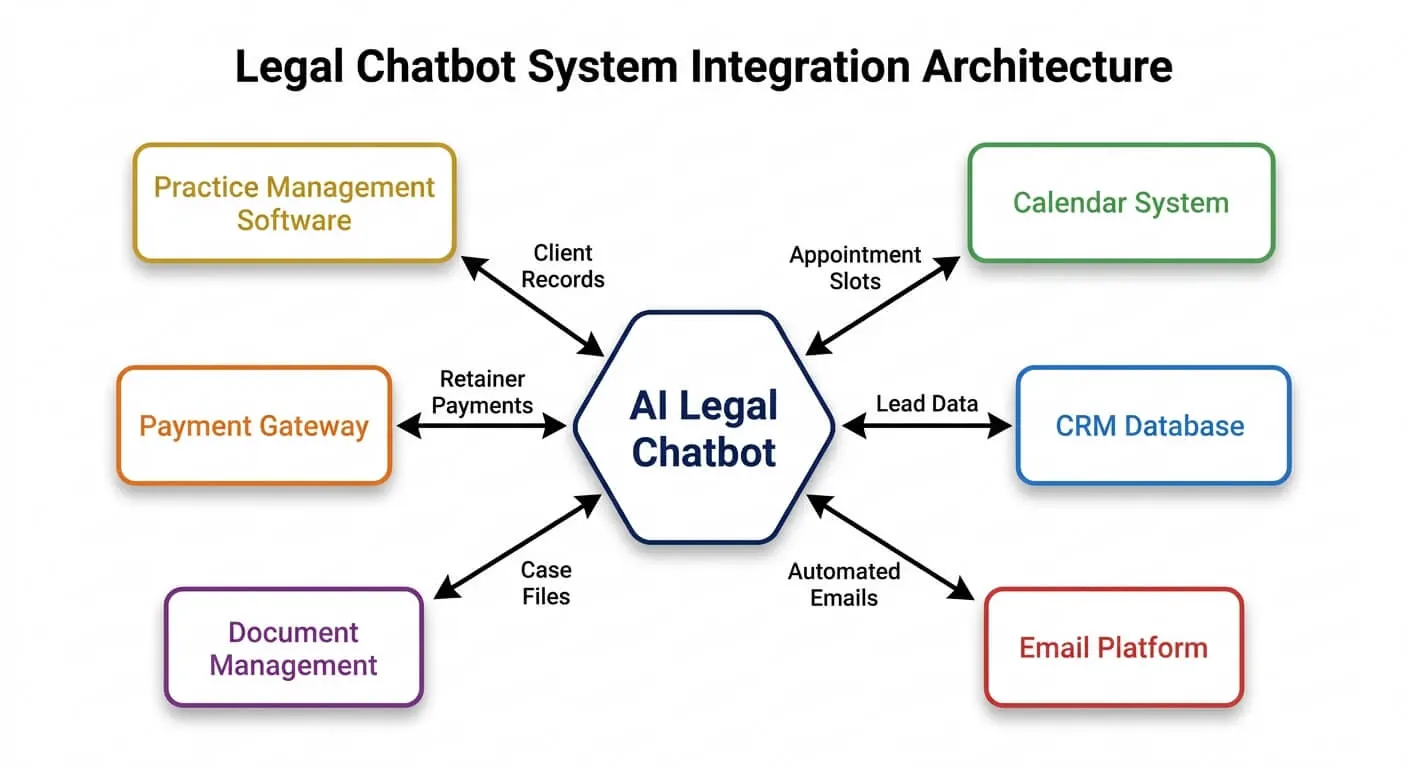
Standalone chatbots create data silos. Effective implementations connect to your practice management stack.
The minimum integration is calendar syncing. Qualified prospects should book directly into attorney calendars. This requires two-way sync to prevent double-booking and respect attorney availability rules.
Practice management integration is more powerful. When a chatbot completes an intake, it can create a new contact record, generate a potential matter, and attach the conversation transcript. Your team starts work with all information already in place.
Automation platforms handle these connections. n8n and Zapier both support legal practice management tools alongside chatbot platforms. A typical workflow might push completed intakes to Clio, create a task for a paralegal to review, and send confirmation emails.
CRM integration matters for firms tracking marketing effectiveness. When chatbot conversations link to your CRM, you can trace which marketing channels generate the best clients. For more on connecting these systems, see my guide on linking CRM and accounting for seamless data flow.
Choosing the Right Platform
Legal chatbot platforms range from generic tools to purpose-built legal solutions. Each approach has tradeoffs.
Generic chatbot builders like Tidio, Intercom, or Drift offer flexibility. You can design any conversation flow. But you build everything yourself. There’s no pre-built legal intake logic or conflict checking. Development time runs higher.
Legal-specific platforms like Lawdroid, Smith.ai, or Intaker come pre-configured for legal intake. They understand practice area terminology and include compliance features. Setup time is shorter. But customisation options may be limited, and pricing is typically higher.
The right choice depends on your firm’s size and complexity. Solo practitioners often start with legal-specific tools that work out of the box. Larger firms with dedicated operations staff may prefer flexible platforms they can customise extensively.
Cost structures vary significantly. Some platforms charge per conversation. Others charge monthly flat rates. Calculate your expected volume before comparing prices. High-volume practices may find flat-rate pricing more economical.
Common Implementation Mistakes
Firms make predictable errors when deploying intake chatbots. Learn from their experiences.
The first mistake is over-automation. Some firms try to replace all human interaction. This backfires. Complex matters need human judgement. High-value prospects expect to speak with a person. Design your chatbot to handle routine intake and escalate appropriately.
The second mistake is poor conversation design. Legal professionals write like lawyers. Chatbots should write like helpful humans. Avoid Latin phrases, technical terminology, and run-on explanations. Test your conversation flows with non-lawyers before launch.
The third mistake is ignoring mobile users. Over 70% of after-hours legal searches happen on mobile devices. Your chatbot must work flawlessly on small screens. Test thoroughly on actual phones, not just browser previews.
The fourth mistake is set-and-forget deployment. Chatbots need ongoing refinement. Review conversation logs weekly. Identify where prospects abandon the intake process. Improve questions that cause confusion.
Getting Started: A Practical Roadmap
Implementing legal intake automation follows a predictable path. Here’s how to begin without overwhelming your firm. IBISWorld’s 2024 industry analysis of legal services found that firms completing technology rollouts within a structured six to eight week timeframe reported measurably smoother staff adoption than those extending implementation beyond three months, reinforcing the value of the phased approach outlined below.
Week one: Document your current intake process. Interview everyone who handles intake calls. List every question asked and every piece of information required. Note decision points where you qualify or disqualify prospects.
Week two: Select your platform. Based on your practice areas, volume, and technical resources, choose between legal-specific and general-purpose tools. Sign up for trials and test conversation builders.
Weeks three and four: Build your initial conversation flows. Start with one practice area. Get the core flow working. Test with staff members posing as prospects. Refine based on feedback.
Week five: Add integrations. Connect your chatbot to your calendar system. Test booking thoroughly. Add practice management connections if feasible.
Week six: Soft launch. Enable the chatbot outside business hours only. This limits risk while you monitor performance. Review every conversation for the first week.
Week seven onward: Expand and refine. Add more practice areas. Enable the chatbot during business hours for overflow. Continue reviewing logs and improving conversation design.
For firms wanting strategic guidance on this process, my assessment service can help identify the best approach for your specific situation.
Frequently Asked Questions
Can chatbots actually qualify legal leads effectively?
Yes, when properly configured. Modern chatbots ask structured questions that mirror your existing intake process. They collect matter type, timeline, jurisdiction, and key facts. The result is a preliminary qualification similar to what a trained receptionist provides.
What happens when someone asks the chatbot a legal question?
Well-designed chatbots redirect legal questions without providing advice. They explain that they’re gathering information for an attorney to review. They don’t interpret laws or suggest outcomes. This keeps your firm compliant while still providing helpful service.
How much does a legal intake chatbot cost?
Pricing varies widely. Basic platforms start around $50 per month. Legal-specific tools with compliance features typically run $200 to $500 per month