n8n Self-Hosted vs Cloud Cost for Small Business: 5 Mistakes That Skew the Sums
Comparing n8n self-hosted vs cloud cost for small business? See the real numbers, hidden maintenance costs and five mistakes to avoid.
Contents
For most small businesses, n8n Cloud costs less overall than self-hosting. The Starter plan runs at roughly $23 a month for 2,500 workflow executions. Self-hosted n8n is free to license, but it needs a server, backups and someone’s time to keep it running. Self-hosting only wins on cost at high volume or with in-house technical skills.
‘It’s free, so why would we pay?’ We hear this almost every time a client discovers n8n can run on their own server. It’s a fair question. It’s also the question behind some of the most expensive automation mistakes we see.
Most comparisons of n8n self-hosted vs cloud cost for small business owners stop at the subscription fee. That’s the wrong place to stop. The real cost includes your time, your risk and how your workflows are built. Below are the five mistakes we see most often, each paired with what to do instead.
A quick note on figures: n8n doesn’t set its prices in dollars, so the dollar amounts here are close approximations. They’ll shift slightly as exchange rates move.
Mistake 1: Treating self-hosted n8n as free
Self-hosted n8n means running the software on a server you control. The Community Edition is free indefinitely and includes almost the complete feature set, but you pay separately for infrastructure and deployment. The licence is free. The server, backups, security updates and the hours spent on them are not.
Here’s what you actually pay for when you self-host:
- A server to run n8n around the clock
- A database and backups, so a crash doesn’t wipe your workflows
- A domain and security certificate, so connections stay encrypted
- Updates, because n8n releases new versions often
- Monitoring, so you know when something fails
In our experience, a modest server for a small team costs somewhere between $10 and $40 a month. That part is genuinely cheap. The trouble is that people see that number and stop counting.
What to do instead: price the whole setup, not just the server. Write down every item above and put a monthly figure next to each one. If you can’t fill in a line, that’s a cost you haven’t planned for yet.
Mistake 2: Comparing monthly fees instead of executions
n8n Cloud charges by workflow executions, not by steps or users. An execution is one complete run of a workflow, however many steps it contains. According to n8n’s pricing page, the Starter plan includes 2,500 executions a month and the Pro plan includes 10,000, at roughly $23 and $58 a month.
This changes how you should think about cost. Every paid plan includes unlimited users, workflows and steps. Only the number of runs counts.
Here’s the surprising part. A 40-step workflow costs exactly the same as a 2-step one. So the cheapest way to build on n8n Cloud is often fewer, bigger workflows, not lots of small ones.
Take an invoice-chasing workflow. It checks for overdue invoices, drafts a reminder, sends it and logs the result in your CRM. Built as one workflow, that’s one execution per run. Split into four linked workflows, it could cost four times as much.
Compare that with Zapier, where every action counts as a task. Zapier is simple to start with, but its per-task pricing punishes growth. n8n’s model rewards you for building thoughtfully.
What to do instead: estimate your executions before you pick a plan. Count how often each trigger fires. If you get 30 new leads a day across 22 working days, that’s 660 runs for one lead workflow. Add your other workflows and you’ll know which plan fits.
Mistake 3: Ignoring the hidden cost of your own time
Maintenance time is the largest hidden cost of self-hosting n8n. n8n Cloud is fully managed, so n8n handles the infrastructure, updates and uptime for you. When you self-host, those jobs land on you or a contractor. In our experience, a well-run small instance needs around two hours of attention a month.
Two hours sounds trivial. But ask yourself who does it, and what their hour is worth.
Now picture the bad day. Your server runs out of disk space on a Saturday night. Nothing alerts you. Monday morning, you find that no invoices went out and 40 leads sat unanswered all weekend. That single failure can cost more than a year of cloud fees.
Self-hosting swaps subscription fees for maintenance responsibility. That’s a fair trade if you have the skills. It’s a poor one if your ‘IT person’ is the office manager who’s already stretched thin.
What to do instead: put a real hourly rate on maintenance and add it to your sums. And whichever option you choose, test properly before going live. Our four-stage guide to testing n8n workflows covers how to catch failures before your customers do.
Mistake 4: Assuming you need a paid self-hosted licence
Most small businesses never need a paid self-hosted n8n licence. The self-hosted Business plan costs €667 a month, billed annually, for 40,000 executions, according to n8n’s pricing. That tier targets larger organisations with stricter governance needs. A 15-person firm automating invoicing and lead follow-up rarely needs any of it.
We’ve seen business owners rule out self-hosting because they looked at that figure and panicked. Others assumed the free version was a cut-down trial. Neither is true.
The licensing is simpler than it looks. The free Community licence applies only to self-hosted n8n. n8n Cloud is always a paid subscription. So your real choice is usually free Community Edition on your own server, or a Starter or Pro plan in the cloud.
What to do instead: start with the cheapest option that fits your volume. Upgrade only when you hit a specific limit, not because a higher tier sounds safer.
Mistake 5: Choosing hosting before mapping the process
Hosting choice matters far less than what you automate. Automating a broken process just creates faster chaos, and no server or subscription fixes that. We map every process before we build anything. Quite often, the mapping shows the real problem was the process itself, not a lack of automation.
In our experience, a typical small business loses 8 to 10 hours a week to manual admin. That’s the prize. Whether n8n runs on your server or theirs is a detail by comparison.
Mapping also gives you the numbers you need for this decision. Once you know each step, you can count triggers, estimate executions and pick a plan with confidence. Our guide on how to map a business process before automating it walks through the method we use.
What to do instead: map first, estimate executions second, choose hosting last.
Running the numbers: n8n self-hosted vs cloud cost for small business
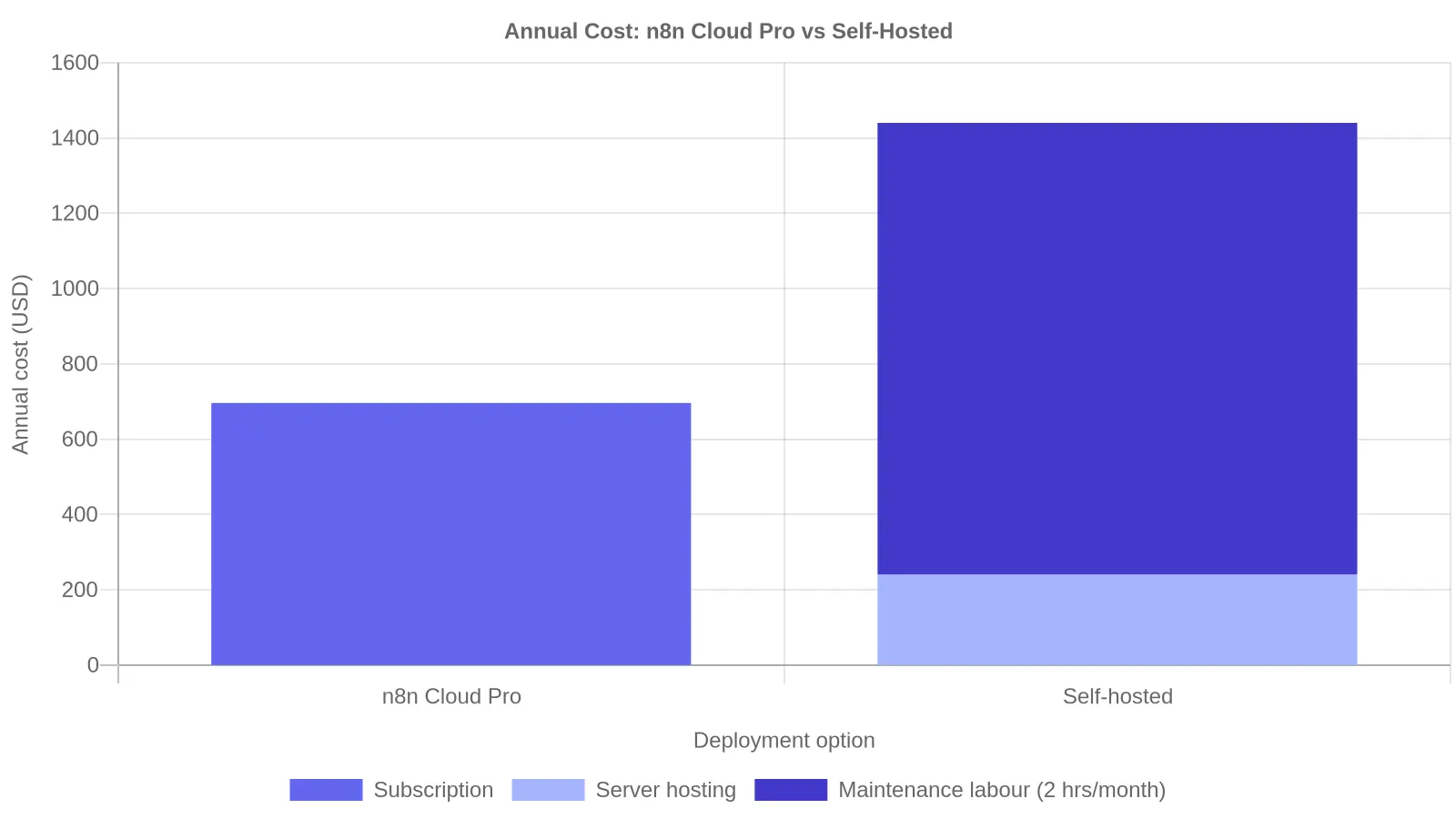
A worked example makes the trade-off clear. Picture a 20-person firm running six workflows at about 4,000 executions a month. That’s too many for Starter, so the cloud option is Pro at roughly $58 a month, or about $696 a year, with no maintenance work required.
Self-hosting the same setup looks like this:
- Server at $20 a month: $240 a year
- Two hours of maintenance a month at $50 an hour: $1,200 a year
- Total: about $1,440 a year
So the ‘free’ option costs roughly $744 more each year. And that’s before a single weekend outage.
Self-hosting does win in three situations. First, when your volume climbs well past 10,000 executions, because you don’t pay per run on your own server. Second, when data has to stay on infrastructure you control, which matters in sectors like healthcare and finance. Third, when someone on your team already runs servers and enjoys it.
There’s also a longer-term argument. Subscription sprawl is a real cost for small businesses, and owning your setup means no vendor can hike prices on you. We cover that wider trade-off in our piece on build vs buy automation.

Our recommendation
Start on n8n Cloud unless you have a clear reason not to. It’s cheaper for most small teams once you count your time, and it lets you focus on building useful workflows. You can move to self-hosting later if your volume or data needs change.
The n8n self-hosted vs cloud cost for small business question isn’t really about servers. It’s about where your hours go. If you’re new to the platform, our complete n8n guide for small businesses is a good next step. For a full picture of what automation will cost you, see how to calculate true AI automation costs. Or book an automation assessment and we’ll run the numbers with you.
Frequently Asked Questions
Is n8n free for small businesses?
The self-hosted Community Edition of n8n is free to license and includes almost the full feature set. You still pay for a server, backups and maintenance time. n8n Cloud is always a paid subscription, starting at roughly $23 a month for 2,500 workflow executions. Free software rarely means zero cost.
How many executions does a small business need each month?
It depends on how often your triggers fire. A business handling 30 leads a day uses about 660 executions a month for one lead workflow. Most small firms running five to ten workflows land between 2,000 and 10,000 executions, which fits the Starter or Pro cloud plans.
Can I move from n8n Cloud to self-hosted later?
Yes. You can export your workflows from n8n Cloud as files and import them into a self-hosted instance. You’ll need to reconnect your credentials, such as app logins and API keys, because those don’t transfer for security reasons. Plan a short testing window before switching live workflows over.
Is self-hosted n8n more secure than n8n Cloud?
Not automatically. Self-hosting gives you control over where data lives, which helps with strict compliance rules. But security then depends on you applying updates, managing access and keeping backups. For most small businesses without dedicated technical staff, a managed cloud service is the safer choice in practice.