Most first-day chaos, a new hire chasing logins, waiting on a laptop, not knowing who to ask about payroll, is admin no human should be doing by hand. That is the argument for automating new employee onboarding with n8n.
That’s where the case to automate new employee onboarding checklist with n8n gets interesting. You can hand the repetitive tasks to a system that never forgets a step. Accounts get created, welcome emails go out, and IT gets notified, all without someone ticking boxes in a spreadsheet.
Structured onboarding processes can improve new-hire productivity. Poor onboarding is also a major driver of early attrition, a problem HR leaders increasingly ask automation to help solve, as reflected in Gartner’s ongoing coverage of workplace technology trends. This guide weighs the realistic options honestly. I’ll look at when to automate, which approach fits your situation, and where a human still needs to stay in the loop.
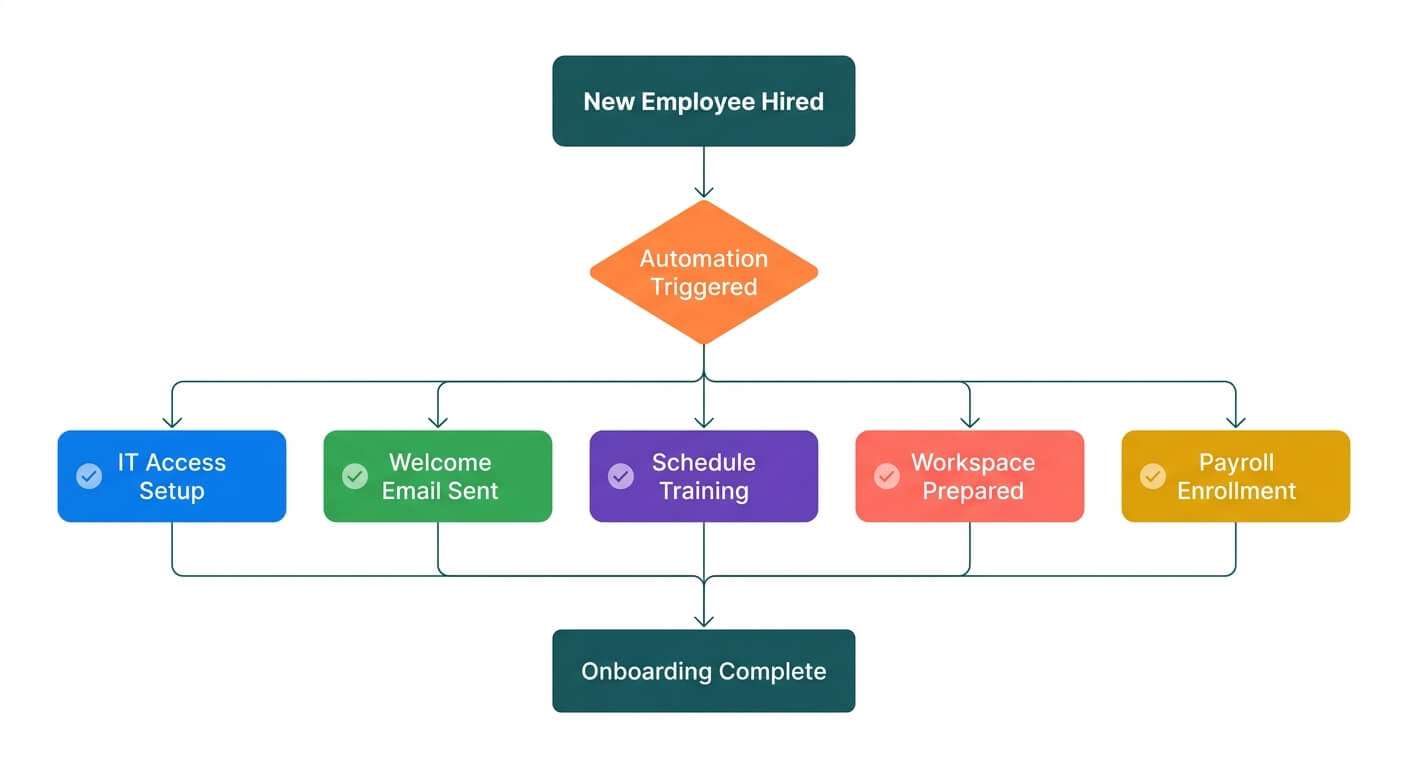 One trigger event starts five onboarding tasks running in parallel
Automating an onboarding checklist means using a workflow tool to trigger tasks automatically when someone joins. In my experience, a typical small business loses 8 to 10 hours a week to manual admin, and onboarding is one of the worst offenders. A single automated flow can remove most of that repetitive setup work.
Should You Automate Onboarding At All?
Onboarding automation is the practice of connecting your HR, IT, and communication tools so a new hire’s setup runs itself. The bigger your team churn, the higher the payoff. A firm hiring one person a quarter gains less than one hiring monthly, but even small teams benefit from consistency.
Here’s the honest test. If you hire fewer than three or four people a year, and your process already works, automation may not earn its keep yet. But if new starters keep missing kit, access, or paperwork, the problem is your process, not your people. As many as one in five new hires leave within their first weeks when onboarding feels disorganised, according to industry research cited by Gartner, which makes the case for fixing the process before it costs you a hire.
Before you build anything, map the steps. I’ve seen owners try to automate a broken process and simply create faster chaos. Mapping the process first often reveals the real problem, which no automation can fix on its own.
What onboarding tasks are worth automating?
Start with the repetitive, rule-based steps. These are the ones that follow the same pattern every time and need no human judgement.
- Creating email and software accounts
- Sending welcome messages and first-week schedules
- Notifying IT to prepare equipment
- Adding the new hire to payroll and HR systems
- Assigning training modules and reading
Keep humans in charge of anything the new person actually feels. A warm welcome call from their manager should stay personal. Automation handles the plumbing, not the relationship. Research published by Harvard Business Review has found that structured onboarding, paired with genuine human contact in the first weeks, significantly increases the likelihood a new hire stays with a company beyond three years.
Why n8n Fits Onboarding Better Than the Alternatives
n8n is an open-source workflow automation platform that connects your apps and runs multi-step processes automatically. It suits onboarding because a single flow can touch many systems at once, from HR software to email to your project tool. You own the logic, and you can self-host it if data control matters.
The main automation tools each make different trade-offs. Zapier is the simplest to start with, but its per-task pricing punishes you as volume grows, a scaling challenge Zapier’s own blog has acknowledged when advising teams on managing automation costs. n8n has a steeper learning curve, yet it gives you control, room to scale, and one system to learn instead of several.
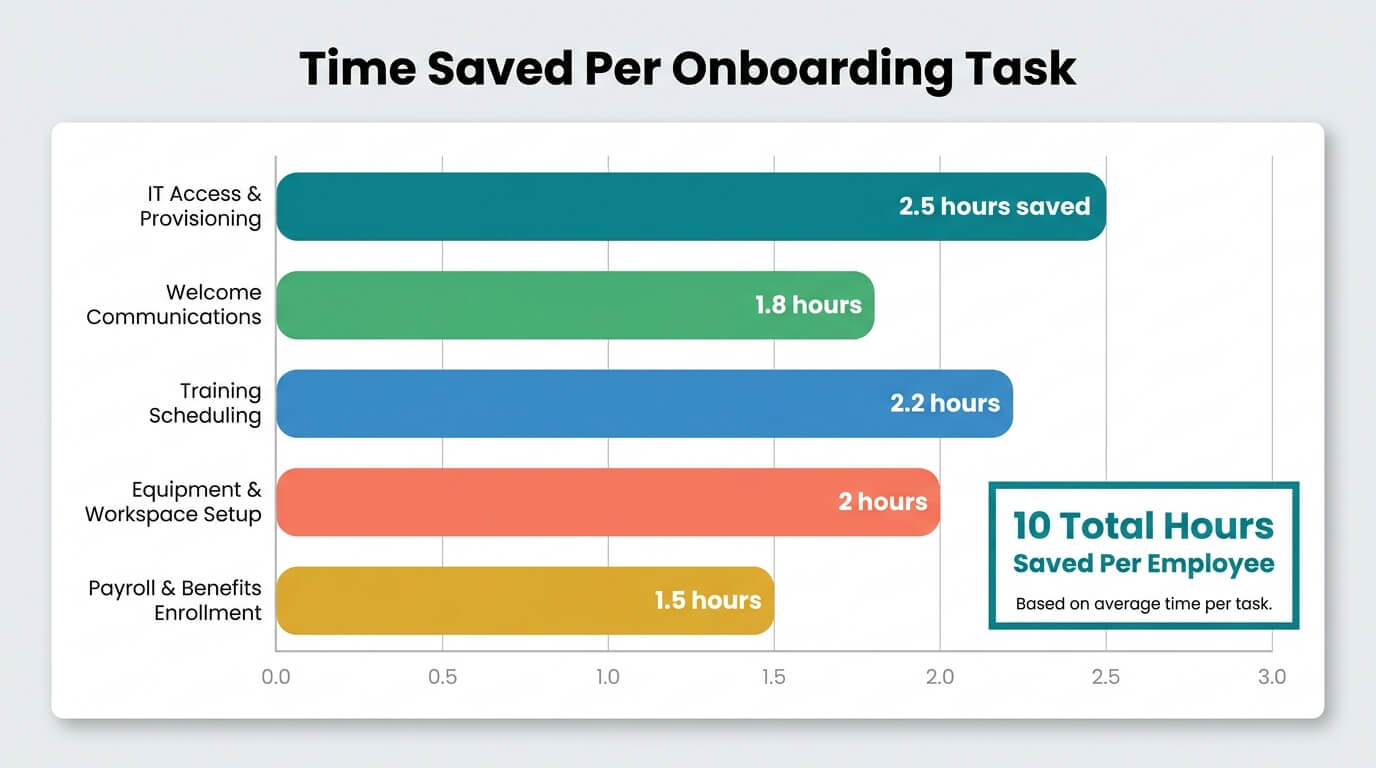 Time savings vary by task, with IT provisioning and training scheduling among the biggest gains
For onboarding specifically, that flexibility counts. A single new hire can trigger ten or more actions across five tools. With per-task billing, that adds up fast. With n8n, the cost stays predictable whether you hire one person or twenty.
If you want a fuller picture of the platform, my n8n workflow automation guide covers the basics for small teams.
The self-hosting question
Self-hosting swaps subscription fees for maintenance responsibility. You own the data and the logic, so no vendor can hike prices or pull the rug. That appeals to firms handling sensitive employee records.
But self-hosting is not free. Someone has to keep the server updated and running. If you have no technical support, the cloud version is the sensible starting point. You can always move later.
Three Ways to Build Your Onboarding Flow
Onboarding automation ranges from a simple welcome email to a full multi-system workflow. The right depth depends on your team size, tool stack, and appetite for maintenance. Most small businesses land somewhere in the middle, automating the highest-friction steps first and expanding over time.
Option one: the starter flow
This is the quickest win. When HR marks someone as hired, n8n sends a welcome email, adds them to a shared calendar, and notifies the manager. It’s a handful of nodes and takes an afternoon to build.
This works well for firms hiring occasionally who just want consistency. It removes the risk of forgetting the welcome pack or the first-day schedule.
Option two: the connected flow
Here you link HR, IT, and communication tools. A new record triggers account creation, an IT ticket for equipment, a payroll entry, and a training assignment. This is where connecting your business applications pays off properly.
This fits growing teams hiring monthly. The upfront build takes longer, but it removes almost all manual setup. One trigger runs the whole checklist.
 Bringing people and systems together is what makes onboarding automation work
Option three: the full lifecycle flow
The most advanced version handles onboarding, mid-role changes, and offboarding from one system. When someone leaves, access gets revoked automatically. This closes a common security gap where former staff keep logins for months.
This approach suits larger SMBs with real compliance needs. It costs more to build and maintain, so only take it on if the volume and risk justify it.
Keeping a Human in the Loop
Good automation knows its limits. I once built an automated system, found it needed a human eye, and deliberately brought it back to human-in-the-loop. I revise my own builds when reality disagrees with the plan.
Onboarding is full of moments that should stay human. The manager’s welcome, the culture chat, the first coffee. Let the system handle accounts and paperwork, and free your people to do the warm parts well.
One practical safeguard: add an approval step before anything sensitive fires. For example, hold payroll creation until a manager confirms the details. This catches typos before they become paycheque errors.
Test before you go live
Never push an onboarding flow straight into production. A broken trigger could leave a new hire with no accounts on day one. Run test records through the whole flow first.
My guide to testing n8n workflows before going live walks through a staged approach. It’s worth the extra hour to avoid an embarrassing first day.
My Recommendation By Situation
If you hire rarely and your process works, stick with a simple checklist and a starter flow. Don’t over-engineer something you use twice a year.
If you hire monthly and juggle several tools, the connected setup is where the real-time savings live. Build it in stages, starting with the noisiest manual step.
If you’re a larger SMB with compliance duties, the full lifecycle approach earns its keep, especially the automatic offboarding. Deciding whether to automate your onboarding process with n8n ultimately comes down to volume, tool spread, and how much control you want over your data.
Whatever you choose, map first, test hard, and keep humans on the parts that matter. If you’d rather not build it yourself, my AI automation service can design and run the whole thing for you.
Frequently Asked Questions
How long does it take to build an onboarding automation in n8n?
A starter flow with a welcome email and calendar entry takes an afternoon. A connected flow linking HR, IT, and payroll takes a few days, mostly spent mapping the process and testing. The full lifecycle version needs a week or more, plus ongoing maintenance once it’s live.
Is n8n better than Zapier for onboarding checklists?
For onboarding, n8n usually wins because a single new hire triggers many actions across several tools. Zapier’s per-task pricing makes that expensive at scale, something Zapier’s own blog has addressed when discussing cost management for growing teams. n8n costs stay predictable and you can self-host for data control. Zapier is simpler to start with if you only automate one or two steps.
Can I automate onboarding without any technical skills?
You can build a basic flow with n8n’s visual editor and no coding, and the n8n documentation is a solid starting point for beginners. The connected and lifecycle versions need more comfort with logic and app connections. If you lack the time or confidence, working with an automation specialist gets you a reliable system without the learning curve.
What onboarding tasks should stay manual?
Keep anything a new hire feels personally. The manager’s welcome, the culture introduction, and answering questions all deserve a human. Automation should handle account setup, paperwork, notifications, and scheduling. This split lets your people focus on making the new starter feel welcome rather than chasing admin.